Table of Contents
Quick Comparison Table
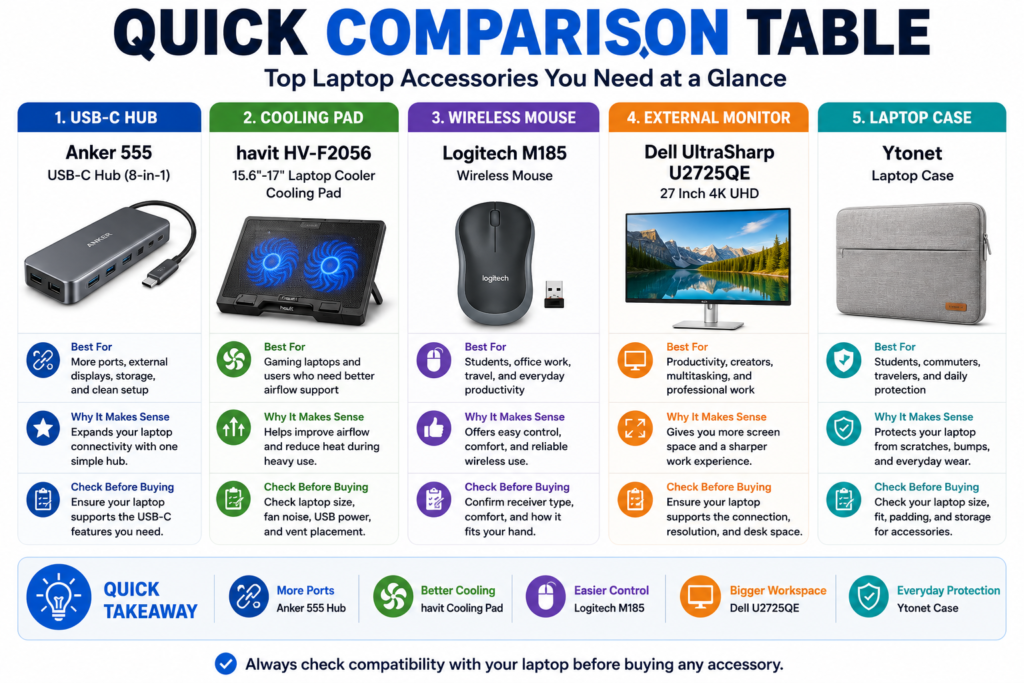
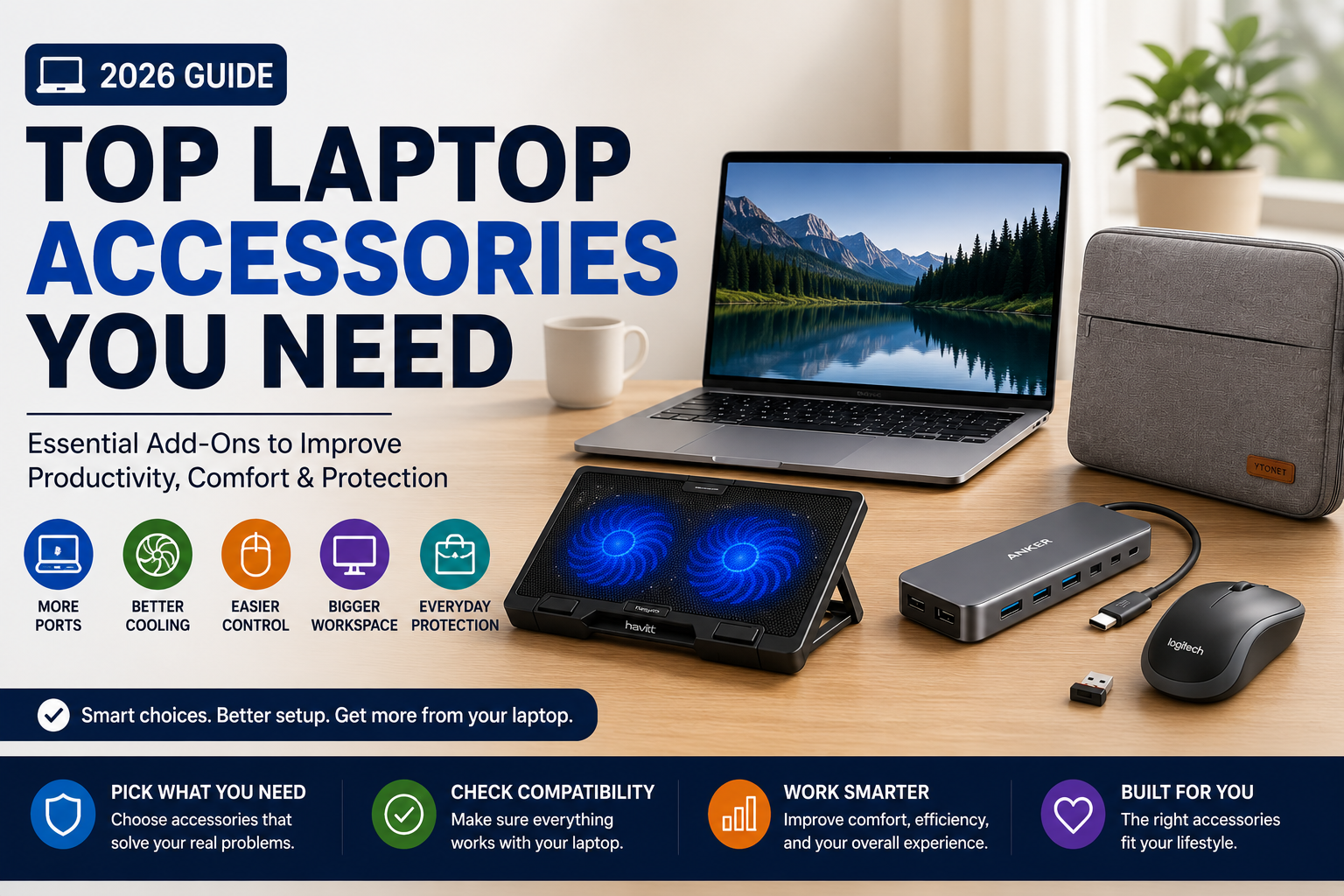
Laptop accessories can make a laptop setup more useful, comfortable, and flexible, but the right accessory depends on what problem you are trying to solve. A USB-C hub helps with ports, a cooling pad helps with airflow support, a wireless mouse improves control, an external monitor expands your workspace, and a laptop case protects the device when you carry it.
This quick comparison table helps you choose based on use case instead of buying accessories only because they look useful. Before buying, always confirm compatibility with your laptop’s ports, size, operating system, display output, charging needs, and daily workflow.
| Accessory | Best For | Why It Makes Sense | Check Before Buying |
|---|---|---|---|
| Anker 555 USB-C Hub (8-in-1) | Users who need more ports, external display support, storage connections, or a cleaner desk setup | It is the best fit in this list if your laptop has limited ports and you want one hub for daily accessories. | Confirm your laptop supports the USB-C features you need, including display output, data transfer, and charging behavior. |
| havit HV-F2056 15.6″-17″ Laptop Cooler Cooling Pad | Gaming laptops, larger laptops, or users who want better airflow around the laptop base | It makes sense if your laptop gets warm during heavier tasks or if you want a raised cooling surface. | Check laptop size, desk space, fan noise expectations, USB power needs, and whether your laptop’s vents align well with the cooling pad. |
| Logitech M185 Wireless Mouse | Students, office users, travelers, and anyone who wants easier control than a trackpad | It is the simplest productivity accessory in this list because it can make browsing, documents, spreadsheets, and daily work more comfortable. | Confirm receiver type, wireless setup, hand comfort, and whether you prefer a compact mouse or a larger ergonomic mouse. |
| Dell UltraSharp U2725QE 27 Inch 4K UHD | Productivity users, creators, office setups, and buyers who want a larger external workspace | It is the best fit if your laptop screen feels too small for multitasking, editing, research, or desk-based work. | Confirm your laptop supports the monitor connection, resolution, refresh behavior, cable type, and desk space requirements. |
| Ytonet Laptop Case | Students, commuters, travelers, and users who carry their laptop between home, school, and work | It helps protect the laptop from everyday carrying, storage, and movement inside a bag. | Check your laptop size, sleeve fit, storage pockets, padding, handle style, and whether it fits your charger or accessories. |
For most users, the easiest accessory to justify is the one that solves a real daily problem. If your laptop does not have enough ports, the Anker 555 USB-C Hub is the most relevant starting point. If your laptop runs warm during heavier workloads, the havit cooling pad may be more useful. If you work for long hours, the Logitech M185 wireless mouse or Dell UltraSharp monitor may improve comfort and productivity.
The Ytonet Laptop Case is different from the other accessories because it is less about performance and more about protection. It makes more sense if you carry your laptop often, store it in a backpack, or want an extra layer between the laptop and daily wear.
Quick takeaway: Choose laptop accessories based on the problem you need to solve: the Anker hub for ports, the havit cooling pad for airflow support, the Logitech mouse for easier control, the Dell monitor for a bigger workspace, and the Ytonet case for everyday protection.
Best Laptop Accessories for Everyday Use
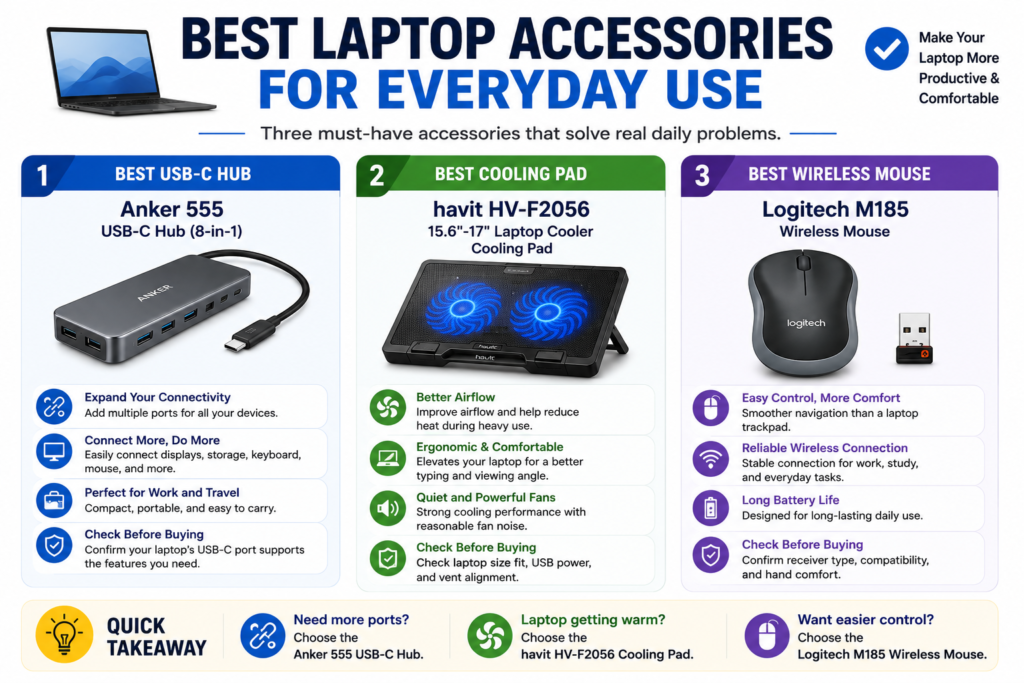
The best laptop accessories for everyday use are not always the most expensive or complicated ones. For most users, the most useful accessories solve simple daily problems: limited ports, uncomfortable control, poor airflow, or a laptop setup that does not feel convenient for work, school, or home use.
In this section, we focus on three practical everyday accessories from the fixed product list: the Anker 555 USB-C Hub (8-in-1), the havit HV-F2056 15.6″-17″ Laptop Cooler Cooling Pad, and the Logitech M185 Wireless Mouse. Each one serves a different purpose, so the right choice depends on what your laptop setup is missing.
Best USB-C Hub: Anker 555 USB-C Hub (8-in-1)
The Anker 555 USB-C Hub (8-in-1) is the best USB-C hub option in this list for users who want to expand their laptop’s connectivity. It makes the most sense if your laptop has limited ports and you regularly connect accessories such as external storage, a monitor, keyboard, mouse, or other desk setup devices.
This type of accessory is especially useful for newer laptops that rely heavily on USB-C. Instead of plugging and unplugging several devices one by one, a USB-C hub can help create a cleaner daily setup. It can be useful for students, remote workers, office users, and anyone who moves between a portable laptop setup and a desk setup.
The main thing to check is compatibility. Not every USB-C port supports the same functions. Before buying, confirm whether your laptop’s USB-C port supports the features you need, such as display output, data transfer, charging behavior, or accessory connections. Do not assume that every USB-C hub works the same way with every laptop.
This hub is the better pick if your biggest problem is port limitation. If your laptop already has all the ports you need, this may not be the first accessory to buy. But if your setup feels restricted every time you connect devices, a USB-C hub is one of the most practical upgrades to consider.
Best Cooling Pad: havit HV-F2056 15.6″-17″ Laptop Cooler Cooling Pad
The havit HV-F2056 15.6″-17″ Laptop Cooler Cooling Pad is the cooling pad option in this list. It is most relevant for users with larger laptops, gaming laptops, or laptops that get warm during heavier workloads. It can also help raise the laptop off the desk, which may improve airflow around the base.
A cooling pad is not a magic fix for every laptop temperature problem. If a laptop is overheating because of dust, blocked vents, poor internal cooling, heavy background apps, or hardware issues, a cooling pad may not fully solve the problem. It is better to treat it as airflow support, not a guaranteed repair solution.
Before buying, check whether your laptop size fits the cooling pad, whether your laptop’s air vents align in a useful way, and whether you have enough desk space. You should also consider how you feel about fan noise, USB power use, and whether you need a flat desk setup or a raised laptop angle.
This cooling pad makes more sense for users who already notice heat during gaming, streaming, multitasking, or longer work sessions. If your laptop stays cool during basic browsing and documents, a cooling pad may be less urgent than a mouse, hub, or protective case.
Best Wireless Mouse: Logitech M185 Wireless Mouse
The Logitech M185 Wireless Mouse is the simplest everyday accessory in this section. It is a practical choice for users who want easier control than a laptop trackpad, especially during browsing, document editing, spreadsheets, schoolwork, office work, or long study sessions.
A wireless mouse can make a laptop feel more comfortable for daily use. Trackpads are useful when you are moving around, but a mouse is often easier for precise clicking, dragging files, editing documents, switching tabs, or working at a desk for longer periods.
Before buying, check the wireless setup and make sure it fits how you use your laptop. Consider whether you prefer a compact mouse, whether you have enough desk space, whether your laptop has the right connection option, and whether the mouse shape feels suitable for your hand size and daily comfort.
The Logitech M185 is the best fit here if your main problem is control and comfort. It will not expand your laptop’s ports or improve cooling, but it can make everyday work feel smoother if you often use your laptop at a desk.
Quick takeaway: Choose the Anker 555 USB-C Hub if you need more connectivity, the havit HV-F2056 Cooling Pad if you want better airflow support, and the Logitech M185 Wireless Mouse if you want easier control for everyday laptop use.
Best Laptop Accessories for Productivity and Comfort
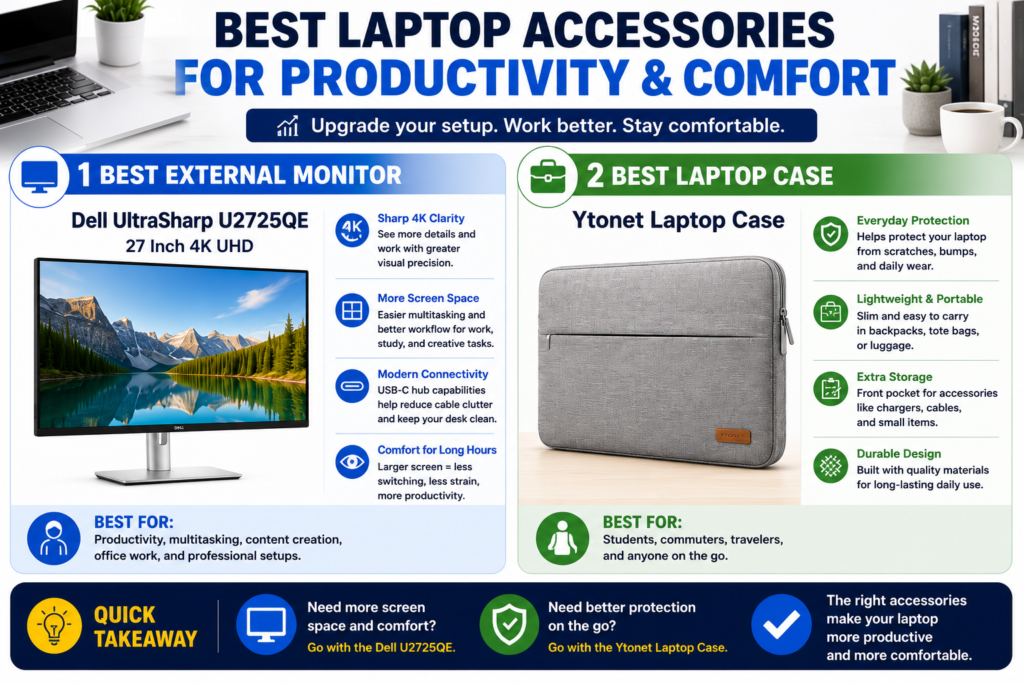
The best laptop accessories for productivity and comfort are the ones that make your laptop easier to use for longer sessions. Some users need a larger screen for multitasking, research, creative work, or office productivity. Others need a protective case because they carry their laptop between home, school, work, and travel.
In this section, the Dell UltraSharp U2725QE 27 Inch 4K UHD and the Ytonet Laptop Case solve two different problems. The Dell monitor is focused on workspace expansion, while the Ytonet case is focused on everyday protection and portability.
Best External Monitor: Dell UltraSharp U2725QE 27 Inch 4K UHD
The Dell UltraSharp U2725QE 27 Inch 4K UHD is the external monitor option in this laptop accessories list. It makes the most sense for users who spend a lot of time working at a desk and want more screen space than a laptop display can provide.
An external monitor can be useful for multitasking, writing, spreadsheets, research, editing, video calls, creative work, or keeping multiple windows open at the same time. Instead of switching between tabs on a small laptop screen, a larger monitor can make a laptop setup feel more like a full desktop workspace.
This type of accessory is most useful if your laptop is often used in one place, such as a home office, study desk, or work setup. It may be less important if you mostly use your laptop on the go, in classrooms, in cafes, or in small spaces where a full monitor setup is not practical.
Before buying an external monitor, confirm that your laptop supports the connection you plan to use. Check the available ports, cable type, display output support, resolution behavior, desk space, and whether you need a USB-C hub or adapter. Do not assume every laptop can use every monitor setup in the same way.
The Dell UltraSharp U2725QE 27 Inch 4K UHD is the best fit here if your main goal is a bigger and more comfortable workspace. It is not the first accessory every laptop user needs, but it can be one of the most useful upgrades for desk-based productivity.
Best Laptop Case: Ytonet Laptop Case
The Ytonet Laptop Case is the protection-focused accessory in this list. It is a better fit for students, commuters, travelers, and anyone who regularly carries a laptop between different places.
A laptop case helps separate the laptop from other items in a backpack, work bag, or travel bag. It can also make daily carrying more organized, especially if you need space for small accessories such as a charger, cable, mouse, or documents. However, it should be treated as everyday protection, not a guarantee against serious drops or damage.
The most important thing to check is fit. A laptop case only makes sense if the size matches your laptop closely enough for safe carrying. Before buying, confirm your laptop size, sleeve dimensions, padding, zipper style, handle design, pocket layout, and whether you want extra room for accessories.
This case is especially useful if your laptop leaves your desk often. If your laptop mostly stays at home, the Ytonet Laptop Case may be less urgent than a mouse, USB-C hub, or external monitor. But if you carry your laptop daily, a protective case can be one of the easiest accessories to justify.
Quick takeaway: Choose the Dell UltraSharp U2725QE 27 Inch 4K UHD if you want a larger desk workspace, and choose the Ytonet Laptop Case if you need better everyday protection when carrying your laptop.
How to Choose the Right Laptop Accessories
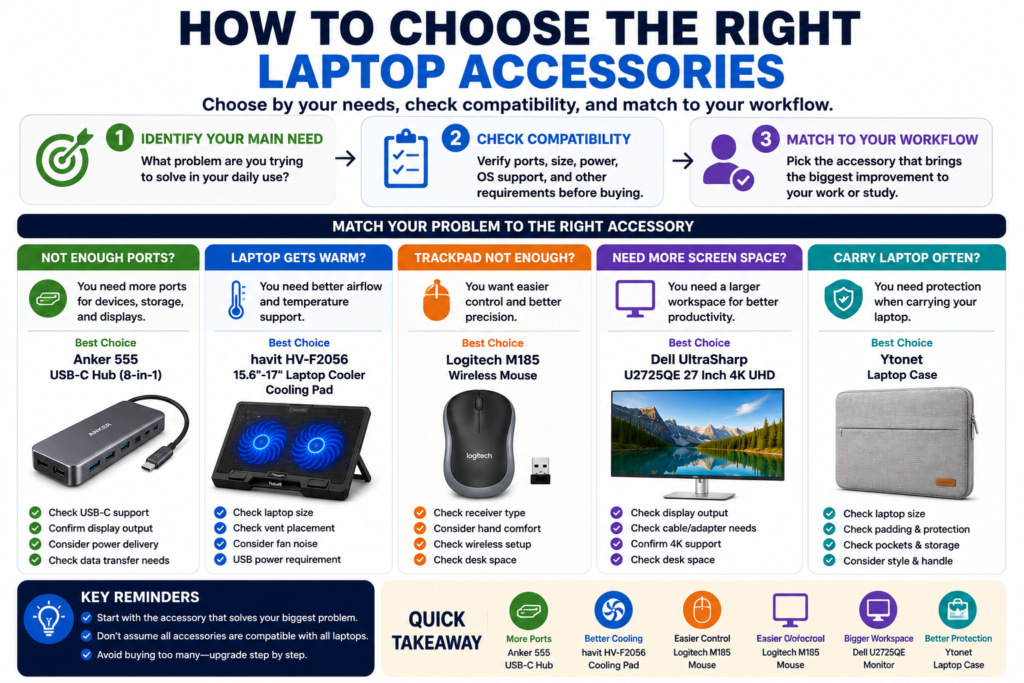
Choosing the right laptop accessories starts with one simple question: what problem are you trying to solve? A good accessory should make your laptop setup easier, more comfortable, more organized, or more useful. It should not be something you buy only because it looks popular.
Before choosing any accessory, think about how you use your laptop most often. A student who carries a laptop every day may need protection first. A remote worker may need more ports or a larger monitor. A gaming laptop user may care more about airflow support. Someone who works long hours may benefit from a mouse or external display before buying anything else.
| Your Main Problem | Accessory Type to Consider | Example from This List | What to Check First |
|---|---|---|---|
| Not enough ports | USB-C hub | Anker 555 USB-C Hub (8-in-1) | Check USB-C support, display output, data transfer needs, and charging behavior. |
| Laptop gets warm during heavier use | Cooling pad | havit HV-F2056 15.6″-17″ Laptop Cooler Cooling Pad | Check laptop size, vent placement, desk space, fan noise expectations, and USB power needs. |
| Trackpad feels uncomfortable | Wireless mouse | Logitech M185 Wireless Mouse | Check receiver type, connection setup, hand comfort, and desk space. |
| Small laptop screen limits productivity | External monitor | Dell UltraSharp U2725QE 27 Inch 4K UHD | Check laptop display output, cable type, resolution support, adapter needs, and desk space. |
| Laptop needs better carrying protection | Laptop case | Ytonet Laptop Case | Check laptop size, sleeve fit, padding, zipper style, handle design, and storage pockets. |
The first step is to separate “nice to have” accessories from accessories that solve a real daily issue. If your laptop already has enough ports, the Anker 555 USB-C Hub may not be urgent. If you rarely work at a desk, the Dell UltraSharp monitor may not be your first upgrade. If your laptop stays at home most of the time, the Ytonet Laptop Case may be less important than a mouse or hub.
The second step is to check compatibility before buying. Laptop accessories often depend on ports, size, operating system, display output, power behavior, and physical fit. A USB-C hub depends on what your laptop’s USB-C port supports. A cooling pad depends on laptop size and airflow design. A monitor depends on display output and cable support. A case depends on the actual laptop size, not just the product category.
The third step is to match accessories to your work style. For school and basic daily use, a wireless mouse and laptop case may be the easiest accessories to justify. For desk productivity, a USB-C hub and external monitor may make a bigger difference. For gaming or heavier laptop use, a cooling pad can be more relevant if airflow support is your main concern.
It also helps to avoid buying too many accessories at once. Start with the one accessory that solves your biggest problem. After using it for a while, you can decide whether your setup still needs more ports, better control, more screen space, cooling support, or better protection.
Not enough ports:
Laptop gets warm during heavier use:
Trackpad feels uncomfortable:
Small laptop screen limits productivity:
Laptop needs better carrying protection:
Quick takeaway: choose laptop accessories by problem first, not by popularity. Pick the Anker hub for port expansion, the havit cooling pad for airflow support, the Logitech mouse for easier control, the Dell monitor for a larger workspace, and the Ytonet case for everyday carrying protection.
Compatibility Checks Before Buying Accessories
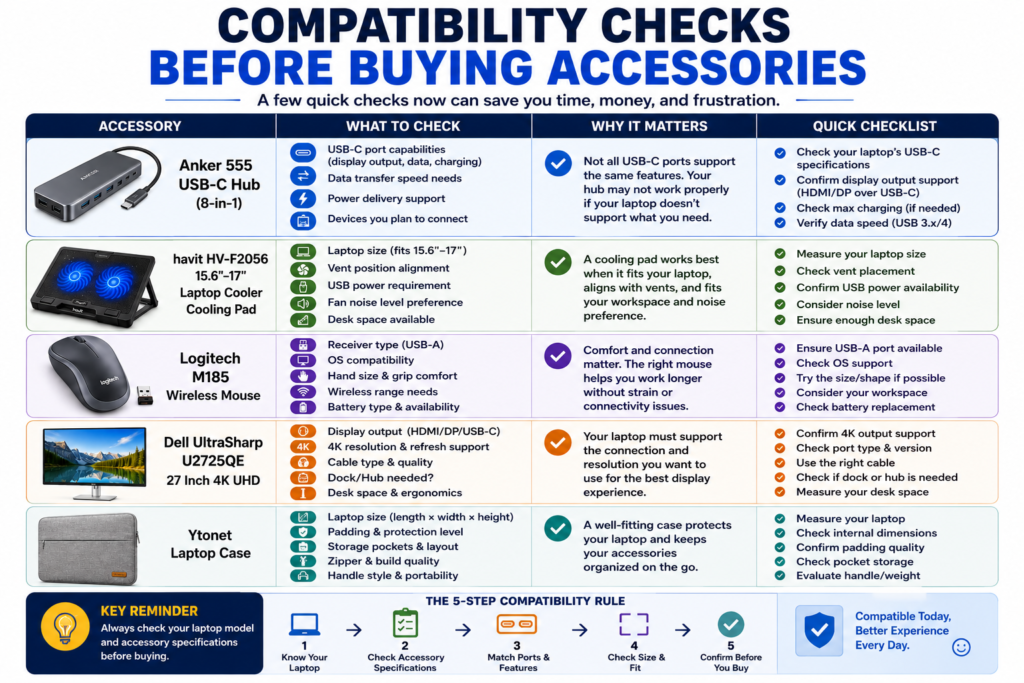
Before buying laptop accessories, compatibility should be the first thing you check. A laptop accessory can look useful, but it may not work the way you expect if your laptop does not support the right port, size, power behavior, wireless setup, display output, or physical fit.
This is especially important for accessories such as USB-C hubs, cooling pads, external monitors, wireless mice, and laptop cases. These products solve different problems, but each one depends on a different type of compatibility check.
| Accessory | Main Compatibility Check | Why It Matters |
|---|---|---|
| Anker 555 USB-C Hub (8-in-1) | USB-C features, display output, data transfer, charging behavior, and connected device needs | Not every USB-C port supports the same functions, so the hub may not deliver every feature on every laptop. |
| havit HV-F2056 15.6″-17″ Laptop Cooler Cooling Pad | Laptop size, vent placement, desk space, USB power, and fan noise expectations | A cooling pad works best when the laptop size and airflow design make sense for the pad layout. |
| Logitech M185 Wireless Mouse | Wireless receiver setup, available port, operating system support, and hand comfort | A wireless mouse should fit both your laptop connection setup and your daily comfort needs. |
| Dell UltraSharp U2725QE 27 Inch 4K UHD | Display output, cable type, adapter needs, resolution support, and desk space | An external monitor depends on whether your laptop can support the connection and display setup you want to use. |
| Ytonet Laptop Case | Laptop size, sleeve fit, padding, zipper style, handle design, and pocket layout | A laptop case only makes sense if the laptop fits properly and the storage layout matches how you carry your device. |
For a USB-C hub, the most important mistake to avoid is assuming that all USB-C ports are the same. Some laptops may support charging through USB-C, some may support display output, and some may only support basic data transfer. Before choosing the Anker 555 USB-C Hub, check your laptop’s product page or manual to confirm what your USB-C port can actually do.
For a cooling pad, size and airflow matter more than appearance. The havit HV-F2056 15.6″-17″ Laptop Cooler Cooling Pad is designed around a specific laptop size range stated in its product name, but you should still confirm your laptop’s size, vent placement, and desk space before buying. A cooling pad may support airflow, but it should not be treated as a guaranteed fix for every heat problem.
For a wireless mouse, check how the mouse connects and whether that setup fits your laptop. The Logitech M185 Wireless Mouse may be a simple accessory, but you should still confirm receiver type, available ports, operating system support, and whether the size and shape feel comfortable for long use.
For an external monitor, the connection path matters. The Dell UltraSharp U2725QE 27 Inch 4K UHD can be useful for a larger workspace, but your laptop still needs to support the display connection you plan to use. Check cable type, adapter needs, resolution support, desk space, and whether your laptop may require a hub or docking setup.
For a laptop case, the biggest compatibility issue is physical fit. The Ytonet Laptop Case should be checked against your laptop’s actual size, not just the general laptop category. Also consider whether you need extra room for a charger, cable, mouse, documents, or small accessories.
One safe buying habit is to check three things before ordering any accessory: your laptop’s exact model, the accessory’s product page, and the specific feature you need. If those three do not match clearly, it is better to slow down and confirm details before buying.
Quick takeaway: compatibility matters more than popularity. Before buying laptop accessories, check ports, size, power behavior, display output, wireless setup, desk space, and physical fit so the accessory actually matches your laptop and daily workflow.
Common Laptop Accessory Buying Mistakes
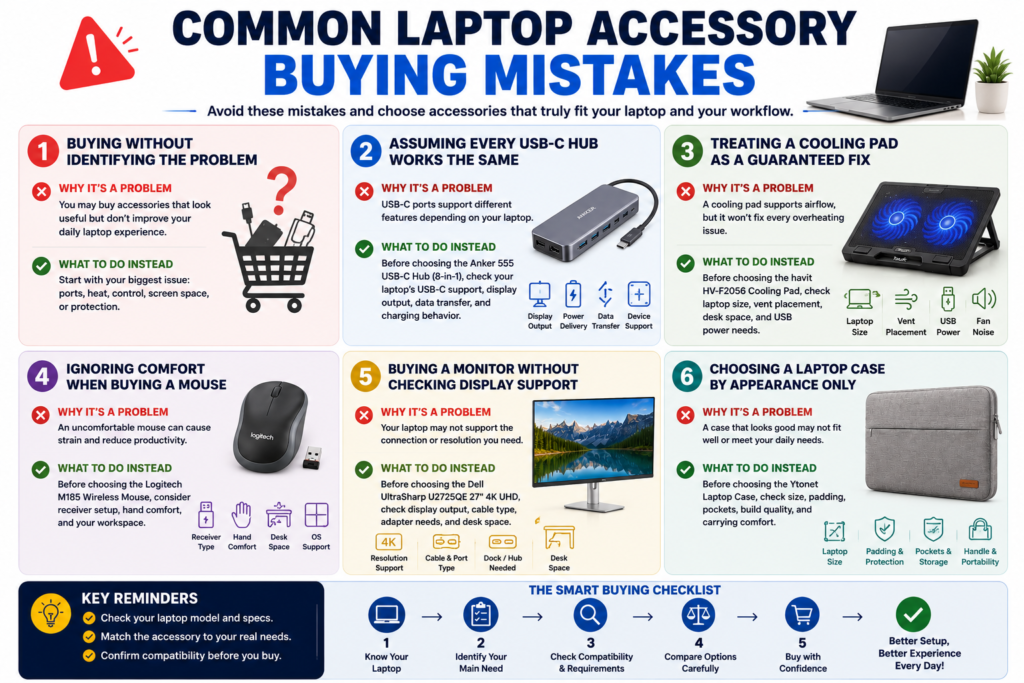
Buying laptop accessories can be helpful, but it is easy to waste money if you choose accessories without checking your real needs, laptop compatibility, desk setup, and daily workflow. Many accessories look useful at first, but they may not solve the problem you actually have.
The safest approach is to avoid buying accessories only because they are popular. Instead, start with the issue you want to fix: limited ports, laptop heat, uncomfortable control, small screen space, or carrying protection.
| Buying Mistake | Why It Can Be a Problem | Better Way to Decide |
|---|---|---|
| Buying accessories before identifying the problem | You may end up with accessories that look useful but do not improve your daily laptop setup. | Start with your biggest issue: ports, airflow, control, screen space, or protection. |
| Assuming every USB-C hub works the same way | USB-C ports can support different features depending on the laptop. | Before choosing the Anker 555 USB-C Hub (8-in-1), confirm your laptop’s USB-C support, display output, data needs, and charging behavior. |
| Treating a cooling pad as a guaranteed heat fix | A cooling pad can support airflow, but it may not solve every overheating issue. | Before choosing the havit HV-F2056 15.6″-17″ Laptop Cooler Cooling Pad, check laptop size, vent placement, desk space, and USB power needs. |
| Ignoring comfort when buying a mouse | A mouse that does not fit your hand or work style may not feel better than the trackpad. | Before choosing the Logitech M185 Wireless Mouse, consider receiver setup, desk space, hand comfort, and how often you work at a desk. |
| Buying an external monitor without checking display support | Your laptop may need the right cable, adapter, hub, or display output support. | Before choosing the Dell UltraSharp U2725QE 27 Inch 4K UHD, check your laptop’s display output, cable type, adapter needs, and desk space. |
| Choosing a laptop case by appearance only | A case that looks good may still fit poorly or lack the storage layout you need. | Before choosing the Ytonet Laptop Case, check laptop size, sleeve fit, padding, zipper style, handle design, and storage pockets. |
One common mistake is buying too many accessories at once. A laptop setup does not need every accessory on day one. If your biggest issue is limited ports, start with a USB-C hub. If your laptop gets warm during heavier use, airflow support may matter more. If daily control feels uncomfortable, a wireless mouse may be the simplest upgrade.
Another mistake is choosing accessories without checking how and where you use your laptop. A Dell UltraSharp external monitor can be useful for a fixed desk setup, but it may not be your first priority if you work mostly outside the home. A Ytonet Laptop Case can be useful for carrying protection, but it may matter less if your laptop rarely leaves your desk.
Compatibility is also a major issue. A USB-C hub depends on what your laptop’s USB-C port supports. A cooling pad depends on laptop size and vent placement. A wireless mouse depends on connection setup and comfort. An external monitor depends on display output and desk space. A laptop case depends on physical fit. Skipping these checks can lead to accessories that do not work the way you expected.
Finally, avoid treating accessories as shortcuts for deeper laptop problems. A cooling pad may help with airflow support, but it does not replace proper laptop maintenance. A monitor may improve workspace comfort, but it does not make a weak laptop more powerful. A case can protect against everyday carrying wear, but it should not be treated as complete damage protection.
Quick takeaway: avoid buying laptop accessories by popularity, appearance, or assumptions. Choose the accessory that solves your real problem, then check compatibility, fit, desk setup, and daily workflow before buying.
FAQ
What laptop accessories do I really need?
The laptop accessories you really need depend on how you use your laptop every day. Most users do not need every accessory at once. The better approach is to start with the accessory that solves your biggest problem.
If your laptop does not have enough ports, a USB-C hub such as the Anker 555 USB-C Hub (8-in-1) may be the most useful first upgrade. If your laptop gets warm during heavier use, the havit HV-F2056 15.6″-17″ Laptop Cooler Cooling Pad may be worth considering. If the trackpad feels uncomfortable, the Logitech M185 Wireless Mouse can make daily control easier. If you work at a desk, the Dell UltraSharp U2725QE 27 Inch 4K UHD can expand your workspace. If you carry your laptop often, the Ytonet Laptop Case can help with everyday protection and organization.
Is a USB-C hub worth it for a laptop?
A USB-C hub is worth it if your laptop has limited ports or if you regularly connect multiple devices. The Anker 555 USB-C Hub (8-in-1) makes sense for users who want more connection options for accessories, external storage, displays, or desk setups.
However, you should not assume every USB-C hub works the same way with every laptop. Before buying, check your laptop’s USB-C port capabilities, display output support, data transfer needs, charging behavior, and the devices you plan to connect.
Do laptop cooling pads actually help?
Laptop cooling pads can help support airflow around the laptop base, especially for larger laptops, gaming laptops, or laptops used for heavier workloads. The havit HV-F2056 15.6″-17″ Laptop Cooler Cooling Pad is the cooling pad option in this list for users who want extra airflow support.
That said, a cooling pad should not be treated as a guaranteed fix for every heat problem. If a laptop is overheating because of dust, blocked vents, aging hardware, heavy background apps, or internal cooling issues, a cooling pad may not fully solve it. Before buying, check laptop size, vent placement, USB power needs, fan noise expectations, and desk space.
Is a wireless mouse better than a laptop trackpad?
A wireless mouse can be better than a laptop trackpad if you work at a desk, edit documents, use spreadsheets, browse for long sessions, or want more precise control. The Logitech M185 Wireless Mouse is a simple everyday accessory for users who want easier navigation than a built-in trackpad.
A trackpad is still useful when you are moving around or using the laptop in a tight space. A wireless mouse is more useful when comfort, control, and longer work sessions matter. Before buying, check receiver type, available ports, wireless setup, hand comfort, and workspace size.
Is an external monitor useful for laptop productivity?
An external monitor can be very useful for laptop productivity if you work at a desk and need more screen space. The Dell UltraSharp U2725QE 27 Inch 4K UHD is the external monitor option in this list for users who want a larger workspace for multitasking, research, writing, editing, creative work, or office tasks.
It may be less useful if you mostly work on the go, in classrooms, in cafes, or in small spaces. Before buying an external monitor, check your laptop’s display output, cable type, adapter needs, resolution support, desk space, and whether you need a hub or docking setup.
How do I choose the right laptop case size?
To choose the right laptop case size, check your laptop’s actual dimensions and compare them with the case size information on the product page. Do not choose only by screen size or laptop category, because laptops with similar screen sizes can have different body dimensions.
The Ytonet Laptop Case is the case option in this list, but you should still confirm fit before buying. Check laptop size, sleeve fit, padding, zipper style, handle design, pocket layout, and whether you need extra space for a charger, cable, mouse, or small accessories.
Can laptop accessories work with Chromebook, Windows, and MacBook?
Some laptop accessories can work across Chromebook, Windows, and MacBook setups, but compatibility depends on the accessory and the laptop. A laptop case depends mostly on physical size. A wireless mouse depends on receiver type, ports, and operating system support. A USB-C hub depends on what the laptop’s USB-C port supports. An external monitor depends on display output and cable support.
Before buying, do not assume that one accessory works perfectly with every laptop. Check your exact laptop model, operating system, available ports, adapter needs, and the accessory’s product details. This is especially important for USB-C hubs and external monitors.
What should I check before buying laptop accessories?
Before buying laptop accessories, check your main problem first. Are you trying to get more ports, improve airflow, make control easier, expand your screen space, or protect your laptop while carrying it?
After that, check compatibility. For the Anker 555 USB-C Hub (8-in-1), confirm USB-C features and display support. For the havit HV-F2056 15.6″-17″ Laptop Cooler Cooling Pad, check size, vents, desk space, and USB power. For the Logitech M185 Wireless Mouse, check receiver setup and comfort. For the Dell UltraSharp U2725QE 27 Inch 4K UHD, check display output, cable type, and workspace. For the Ytonet Laptop Case, check physical fit, padding, pockets, and carrying style.
Quick takeaway: the best laptop accessories are the ones that solve a real problem in your daily setup. Choose by need first, then check compatibility, size, ports, display output, comfort, and fit before buying.
Final Thought
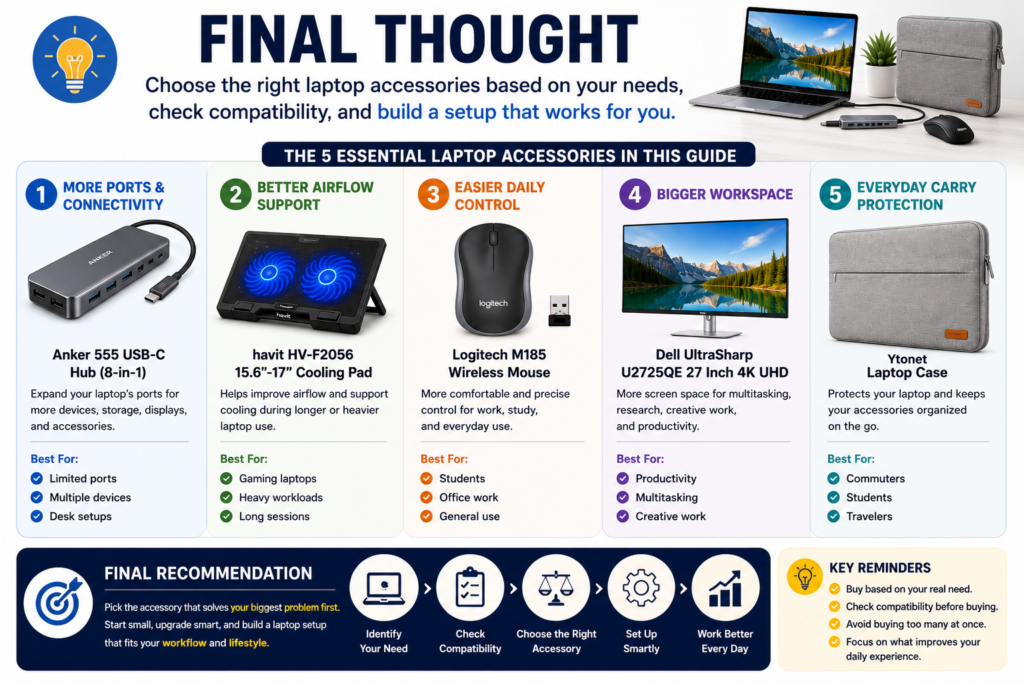
The best laptop accessories are not the ones with the longest feature list. They are the accessories that solve a real problem in your daily laptop setup. Before buying anything, think about whether you need more ports, better airflow support, easier control, a larger workspace, or better carrying protection.
If your laptop feels limited because it does not have enough ports, the Anker 555 USB-C Hub (8-in-1) is the most relevant option in this list. It is best for users who want to connect more devices, storage, displays, or desk accessories through a cleaner setup. Just make sure your laptop’s USB-C port supports the features you need before buying.
If your laptop gets warm during heavier use, the havit HV-F2056 15.6″-17″ Laptop Cooler Cooling Pad may be worth considering. It is best treated as airflow support, not a guaranteed fix for every heat issue. Check laptop size, vent placement, USB power needs, fan noise expectations, and desk space before choosing it.
If your trackpad feels uncomfortable for long sessions, the Logitech M185 Wireless Mouse is the simplest everyday upgrade. It makes sense for students, office users, home users, and anyone who wants easier control for browsing, documents, spreadsheets, and daily work.
If your laptop screen feels too small for productivity, the Dell UltraSharp U2725QE 27 Inch 4K UHD is the desk-focused option in this list. It is best for users who work in one place and want more screen space for multitasking, research, creative work, writing, or office tasks. Before buying, check display output, cable type, adapter needs, resolution support, and desk space.
If you carry your laptop often, the Ytonet Laptop Case is the protection-focused accessory. It is useful for students, commuters, travelers, and users who move between home, school, work, and other places. The main thing to check is physical fit, including laptop size, padding, zipper style, handle design, and storage pockets.
| If You Need… | Best Accessory to Consider | Why It Makes Sense |
|---|---|---|
| More ports and connectivity | Anker 555 USB-C Hub (8-in-1) | Helps expand a limited laptop setup with more connection options. |
| Better airflow support | havit HV-F2056 15.6″-17″ Laptop Cooler Cooling Pad | Useful for larger laptops or heavier sessions where airflow around the base matters. |
| Easier daily control | Logitech M185 Wireless Mouse | Improves comfort for browsing, documents, spreadsheets, and desk work. |
| A larger workspace | Dell UltraSharp U2725QE 27 Inch 4K UHD | Expands a laptop setup for multitasking, research, writing, creative work, and productivity. |
| Everyday carrying protection | Ytonet Laptop Case | Helps protect and organize a laptop when carrying it between places. |
The most important rule is to buy based on your real workflow. A student may need a laptop case and wireless mouse first. A remote worker may benefit more from a USB-C hub and external monitor. A gaming laptop user may care more about airflow support. A commuter may prioritize protection and portability.
Do not buy accessories only because they are popular. Start with your biggest daily problem, check compatibility carefully, and choose the accessory that gives your laptop setup the most practical improvement.
Final recommendation: choose the Anker 555 USB-C Hub if you need more ports, the havit HV-F2056 Cooling Pad if you want airflow support, the Logitech M185 Wireless Mouse if you want easier control, the Dell UltraSharp U2725QE if you need a larger workspace, and the Ytonet Laptop Case if you carry your laptop often. The right accessory is the one that matches your laptop, your workflow, and the problem you actually need to solve.