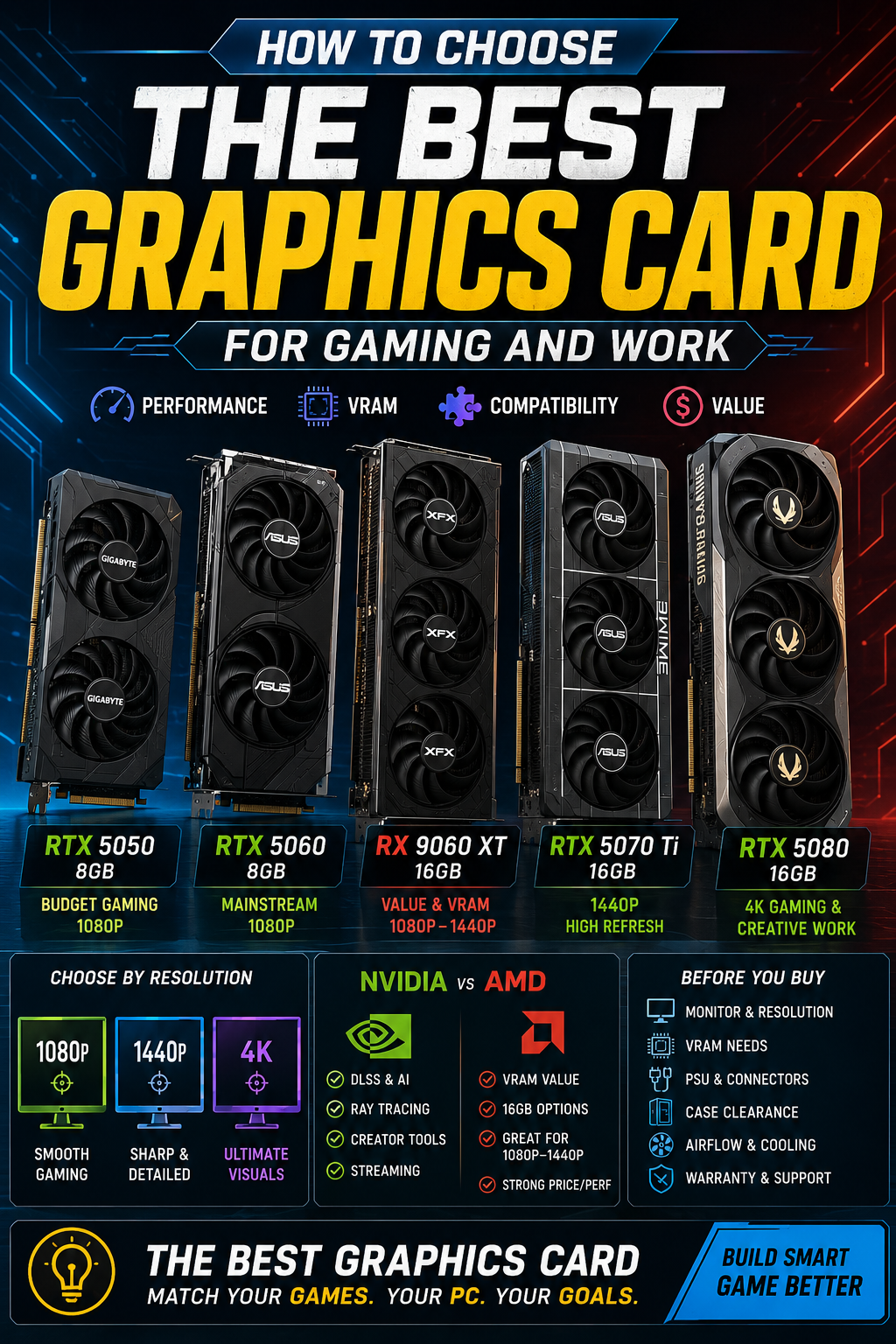
Table of Contents
Quick Comparison Table
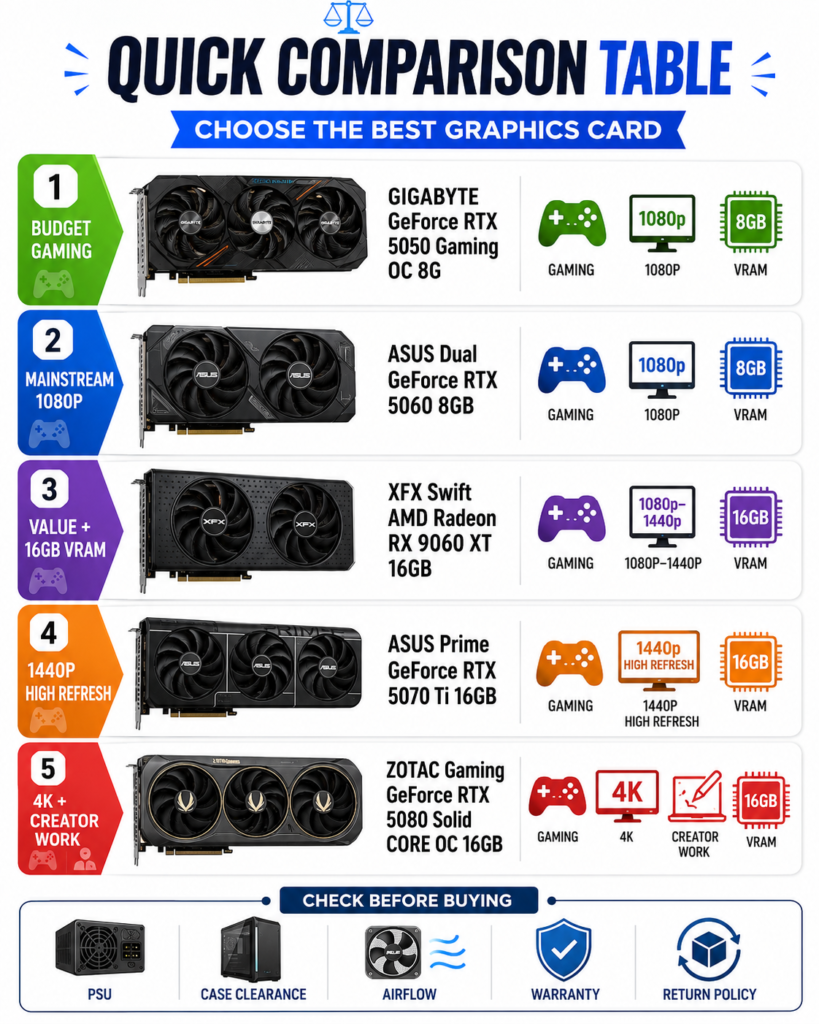
Choosing the best graphics card is easier when you start with your actual use case instead of only comparing model names. A good GPU for budget 1080p gaming may not be the right choice for 1440p high refresh gaming, 4K gaming, streaming, or creative work.
This quick comparison table helps you match each graphics card in this list to the type of buyer it fits best. Before buying, always check your monitor resolution, power supply, case clearance, airflow, seller reputation, warranty, and return policy.
| Buyer Need | Best Match from This List | Why It Makes Sense | What to Check Before Buying |
|---|---|---|---|
| Lowest-cost NVIDIA gaming upgrade | GIGABYTE GeForce RTX 5050 Gaming OC 8G | Best for budget 1080p gaming, esports titles, lighter games, and simple upgrades from older GPUs. | Check whether 8GB VRAM is enough for your games and settings. |
| Mainstream 1080p gaming | ASUS Dual GeForce RTX 5060 8GB | A stronger mainstream NVIDIA option for buyers who want better 1080p gaming performance and modern RTX features. | Check GPU length, airflow, and whether 8GB VRAM fits your long-term needs. |
| Value-focused gaming with more VRAM | XFX Swift AMD Radeon RX 9060 XT 16GB | Good for buyers who want 16GB VRAM headroom for 1080p to 1440p gaming and higher texture settings. | Compare AMD features with NVIDIA features if you care about DLSS, ray tracing, or creator software support. |
| 1440p high refresh gaming | ASUS Prime GeForce RTX 5070 Ti 16GB | Better for demanding games, higher settings, ray tracing, and stronger 1440p performance headroom. | Check PSU capacity, power connectors, case clearance, and airflow before buying. |
| 4K gaming and creative work | ZOTAC Gaming GeForce RTX 5080 Solid CORE OC 16GB | Best for high-end gaming PCs, 4K gaming, ray tracing, content creation, rendering, and heavier GPU workloads. | Make sure your system has enough power, cooling, space, and a reliable return policy. |
Quick takeaway: choose the RTX 5050 for budget gaming, the RTX 5060 for mainstream 1080p, the RX 9060 XT for value and 16GB VRAM, the RTX 5070 Ti for 1440p high refresh gaming, and the RTX 5080 for 4K gaming or creative work. The best graphics card is the one that matches your monitor, games, budget, and PC compatibility.
Choose Based on Your Main Use Case
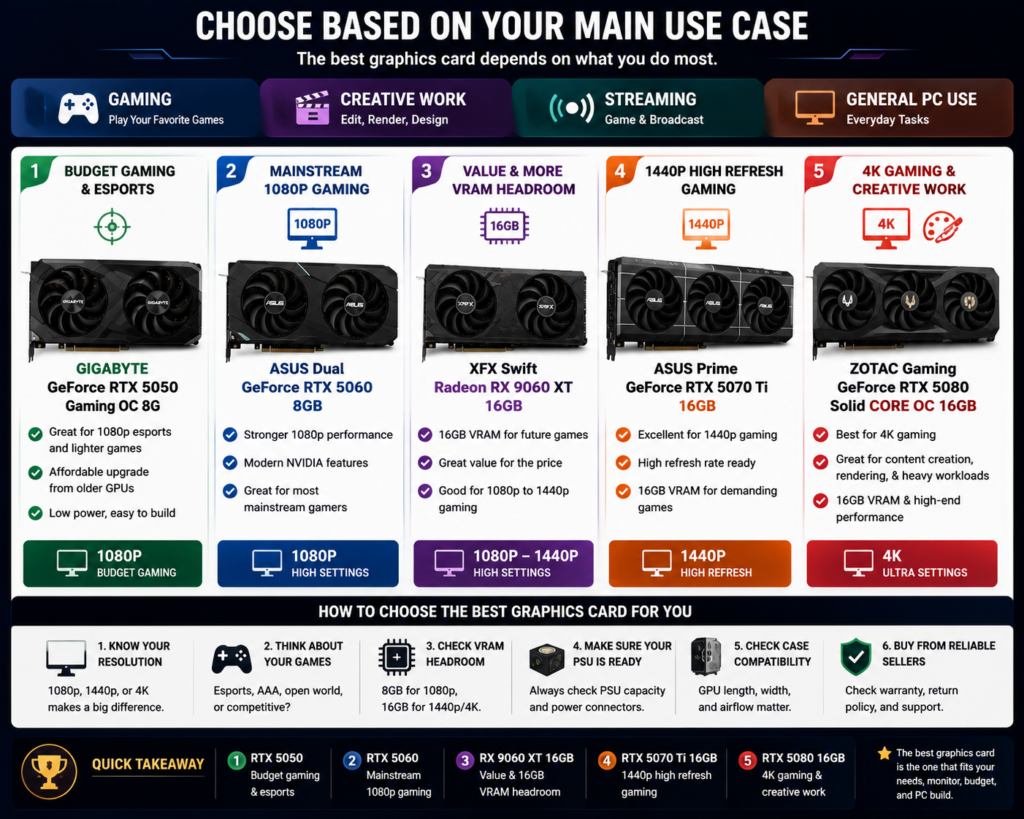
The best graphics card for you depends on what you do most with your PC. A gamer, video editor, streamer, casual user, and 4K creator do not need the same GPU. Before comparing model names, start by deciding your main use case.
This matters because different workloads stress a graphics card in different ways. Gaming depends heavily on resolution, settings, VRAM, ray tracing, and upscaling support. Creative work may depend more on software support, GPU acceleration, and memory headroom. Streaming adds another layer because you need enough performance for both gameplay and encoding.
Gaming, Creative Work, Streaming, or General PC Use
If your main goal is budget gaming or esports, you do not need to start with the most expensive card. The GIGABYTE GeForce RTX 5050 Gaming OC 8G is the entry-level NVIDIA option in this list and makes the most sense for lighter 1080p gaming, esports titles, and simple upgrades from older GPUs.
If you want a stronger mainstream 1080p gaming card, the ASUS Dual GeForce RTX 5060 8GB is a better fit. It is more suitable for users who want modern NVIDIA features, stronger 1080p gaming performance, and a cleaner dual-fan card for many standard PC builds.
If your main concern is VRAM value, the XFX Swift AMD Radeon RX 9060 XT 16GB is worth comparing. Its 16GB memory gives more headroom for modern games, higher texture settings, and 1080p to 1440p gaming. It may be a practical option if you care more about VRAM value than NVIDIA-specific features.
If you play at 1440p, want higher refresh rates, or use more demanding settings, the ASUS Prime GeForce RTX 5070 Ti 16GB is the stronger match. It gives more performance and VRAM headroom than the 8GB cards, making it a better fit for more serious gaming setups.
If your main use case is 4K gaming, content creation, rendering, or heavier GPU workloads, the ZOTAC Gaming GeForce RTX 5080 Solid CORE OC 16GB is the high-end option in this list. It is the best fit for users who want stronger performance headroom and are building a more powerful PC.
| Main Use Case | Best Direction | Recommended Pick from This List | Why It Fits |
|---|---|---|---|
| Budget gaming / esports | Entry-level NVIDIA GPU | GIGABYTE GeForce RTX 5050 Gaming OC 8G | Good for lighter 1080p gaming, esports, and simple budget upgrades. |
| Mainstream 1080p gaming | Stronger mainstream RTX card | ASUS Dual GeForce RTX 5060 8GB | Better for users who want modern NVIDIA features and stronger 1080p performance. |
| Value-focused gaming | More VRAM for the money | XFX Swift AMD Radeon RX 9060 XT 16GB | Useful for buyers who want 16GB VRAM headroom for 1080p to 1440p gaming. |
| 1440p high refresh gaming | Higher-performance 16GB GPU | ASUS Prime GeForce RTX 5070 Ti 16GB | Better for higher settings, demanding games, and stronger 1440p performance. |
| 4K gaming / creative work | High-end GPU | ZOTAC Gaming GeForce RTX 5080 Solid CORE OC 16GB | Best for 4K gaming, creator workloads, ray tracing, and heavier GPU tasks. |
For general PC use, office work, browsing, and light media, you may not need a high-end graphics card at all. A lower-tier GPU may be enough unless you also plan to game, edit video, stream, or use GPU-heavy software.
For streaming, think about both gaming performance and encoding support. NVIDIA cards may be more attractive if you want RTX features, DLSS-supported games, and broad creator software support. AMD may be more attractive if your priority is VRAM value and traditional gaming performance.
Quick takeaway: choose your graphics card based on what you do most. Pick the RTX 5050 for budget gaming, the RTX 5060 for mainstream 1080p gaming, the RX 9060 XT for value and 16GB VRAM, the RTX 5070 Ti for 1440p high refresh gaming, and the RTX 5080 for 4K gaming or creative work.
Pick the Right Graphics Card for Your Resolution
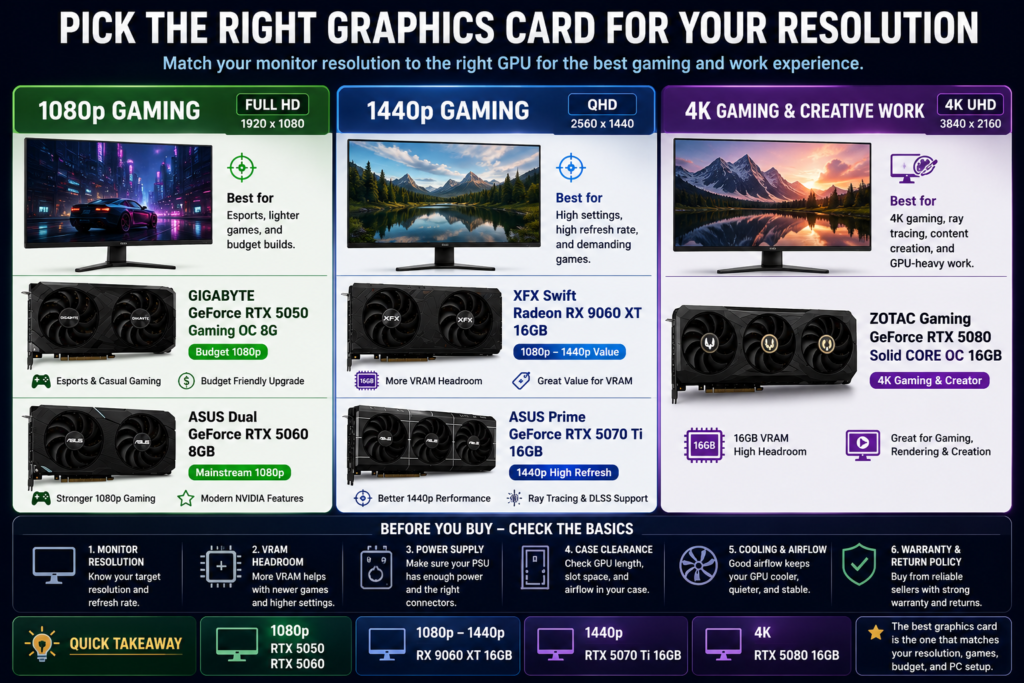
The best graphics card for your PC should match the resolution you actually play or work at. A card that is enough for 1080p gaming may not be the right choice for 1440p high refresh gaming or 4K creative workloads. Before choosing a GPU, start with your monitor resolution first.
Resolution matters because higher resolution puts more demand on the graphics card. 1080p is easier to run, 1440p needs more performance headroom, and 4K requires a stronger GPU, better cooling, more careful power planning, and often more VRAM flexibility.
1080p, 1440p, and 4K Gaming Needs
For budget 1080p gaming, the GIGABYTE GeForce RTX 5050 Gaming OC 8G is the entry-level option in this list. It is best for esports titles, lighter games, casual gaming, and users who want a lower-cost NVIDIA card for a simple upgrade.
For stronger mainstream 1080p gaming, the ASUS Dual GeForce RTX 5060 8GB is the better match. It makes more sense if you want better 1080p performance, modern NVIDIA features, and a card that fits many standard gaming PC builds.
For users who want more VRAM headroom for 1080p to 1440p gaming, the XFX Swift AMD Radeon RX 9060 XT 16GB is worth comparing. Its 16GB memory may be useful for higher texture settings, newer games, and buyers who care more about VRAM value than NVIDIA-specific features.
For 1440p high refresh gaming, the ASUS Prime GeForce RTX 5070 Ti 16GB is the better fit in this list. It gives more performance headroom than the 8GB cards and is better suited for demanding games, higher settings, ray tracing, and smoother 1440p gaming experiences.
For 4K gaming and heavier creative work, the ZOTAC Gaming GeForce RTX 5080 Solid CORE OC 16GB is the high-end option. It is best suited for users who want stronger performance headroom for 4K gaming, content creation, rendering, and GPU-heavy workloads.
| Resolution Target | Best Match from This List | Best For | What to Check |
|---|---|---|---|
| Budget 1080p | GIGABYTE GeForce RTX 5050 Gaming OC 8G | Esports, lighter games, casual 1080p gaming, and budget upgrades | Check whether 8GB VRAM is enough for your games and settings. |
| Mainstream 1080p | ASUS Dual GeForce RTX 5060 8GB | Stronger 1080p gaming, modern NVIDIA features, and standard PC builds | Check case clearance, airflow, and long-term VRAM needs. |
| 1080p to 1440p value | XFX Swift AMD Radeon RX 9060 XT 16GB | Buyers who want more VRAM headroom and value-focused gaming | Compare AMD value with NVIDIA features before choosing. |
| 1440p high refresh | ASUS Prime GeForce RTX 5070 Ti 16GB | Demanding games, higher settings, ray tracing, and stronger 1440p performance | Check PSU capacity, power connectors, case space, and airflow. |
| 4K gaming / creative work | ZOTAC Gaming GeForce RTX 5080 Solid CORE OC 16GB | 4K gaming, content creation, rendering, and heavier GPU workloads | Check PSU, cooling, case clearance, seller, warranty, and return policy. |
If you are using a 1080p monitor, do not automatically buy the most expensive card. A high-end GPU may be more than you need unless you plan to upgrade your monitor later, play very demanding games, or use GPU-heavy software.
If you are using a 1440p monitor, you should care more about performance headroom and VRAM. This is where 16GB cards become more attractive, especially if you want higher settings, ray tracing, or a smoother experience in newer games.
If you are using a 4K monitor, the graphics card becomes one of the most important parts of the whole build. You should also check the rest of your system carefully, including the CPU, power supply, case airflow, and cooling setup.
Quick takeaway: choose your graphics card based on your monitor resolution first. Pick the RTX 5050 or RTX 5060 for 1080p, compare the RX 9060 XT 16GB if you want more VRAM value, choose the RTX 5070 Ti for 1440p high refresh gaming, and choose the RTX 5080 for 4K gaming or creative work.
VRAM, Memory Type, and Long-Term Headroom
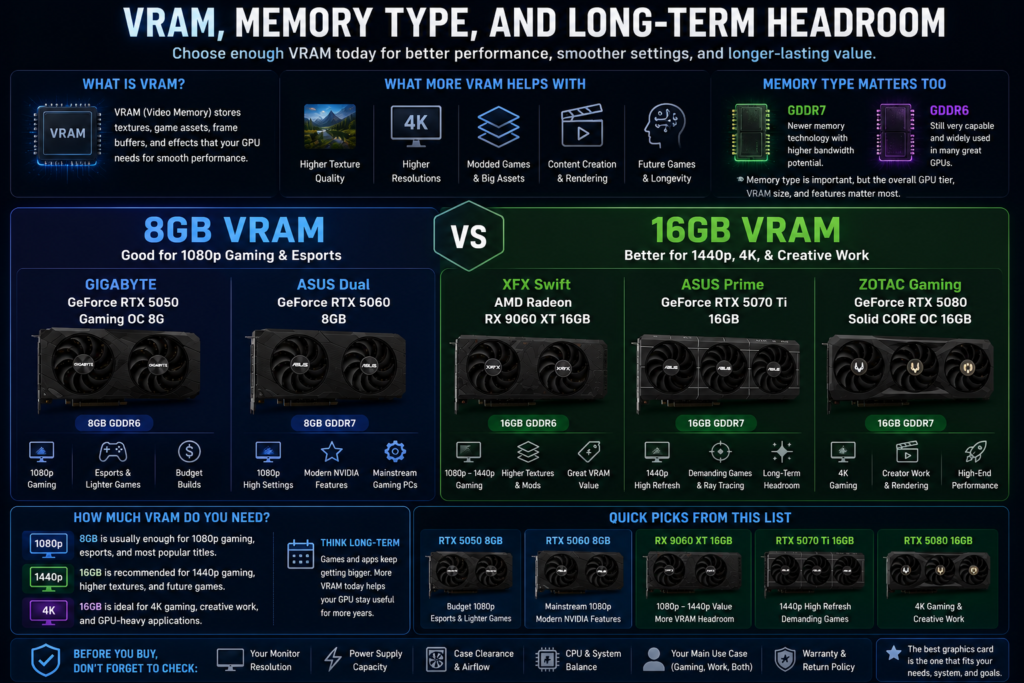
When choosing the best graphics card, VRAM is one of the most important details to understand. VRAM, or video memory, helps the graphics card handle textures, game assets, frame buffers, higher resolutions, creative workloads, and visual effects while a game or application is running.
However, more VRAM does not automatically mean a graphics card is faster in every situation. GPU performance, memory type, software support, cooling, power limits, and the games you play all matter. The key is to choose enough VRAM for your resolution, settings, and long-term needs without paying for performance you may not use.
8GB vs 16GB VRAM
An 8GB graphics card can still make sense for budget and mainstream 1080p gaming. In this list, the GIGABYTE GeForce RTX 5050 Gaming OC 8G and ASUS Dual GeForce RTX 5060 8GB are both 8GB cards. They are better suited for 1080p gaming, esports titles, lighter games, and users who do not need heavy texture packs or 4K workloads.
The main concern with 8GB VRAM is long-term headroom. Some newer games, higher texture settings, mods, 1440p gaming, and creative workloads can use more memory. If your GPU runs out of usable VRAM, performance may become less stable, and you may need to lower texture quality or other visual settings.
A 16GB graphics card gives more flexibility. In this list, the XFX Swift AMD Radeon RX 9060 XT 16GB, ASUS Prime GeForce RTX 5070 Ti 16GB, and ZOTAC Gaming GeForce RTX 5080 Solid CORE OC 16GB offer more memory headroom for higher settings, 1440p gaming, 4K gaming, content creation, and longer-term use.
| VRAM Level | Best For | Recommended Pick from This List | What to Consider |
|---|---|---|---|
| 8GB VRAM | Budget 1080p gaming, esports, lighter games, and casual gaming | GIGABYTE GeForce RTX 5050 Gaming OC 8G | Good for lower-cost builds, but may feel limited in newer games or higher texture settings. |
| 8GB VRAM with newer memory type | Mainstream 1080p gaming and users who want modern NVIDIA features | ASUS Dual GeForce RTX 5060 8GB | Better for mainstream 1080p gaming, but still has less memory headroom than 16GB cards. |
| 16GB VRAM value option | 1080p to 1440p gaming, higher textures, and buyers who want more memory headroom | XFX Swift AMD Radeon RX 9060 XT 16GB | Good for VRAM value, but compare AMD features with NVIDIA features before choosing. |
| 16GB VRAM for 1440p | 1440p high refresh gaming, demanding games, and stronger long-term flexibility | ASUS Prime GeForce RTX 5070 Ti 16GB | Better if you want more performance headroom and NVIDIA features for higher-end gaming. |
| 16GB VRAM for high-end use | 4K gaming, creative work, rendering, and heavier GPU workloads | ZOTAC Gaming GeForce RTX 5080 Solid CORE OC 16GB | Best suited for high-end systems, but check PSU, cooling, case clearance, and budget. |
Memory type also matters, but it should not be the only factor. GDDR7 cards may offer newer memory technology compared with GDDR6 cards, but real buying decisions should still consider the full GPU tier, VRAM amount, features, cooling, and system compatibility.
If you mainly play esports titles or lighter games at 1080p, 8GB may be enough. If you want higher texture settings, newer AAA games, mods, 1440p gaming, 4K gaming, or creative workloads, 16GB gives you more breathing room.
Quick takeaway: choose 8GB VRAM if you are building a budget or mainstream 1080p gaming PC. Choose 16GB VRAM if you want more long-term headroom for 1440p gaming, 4K gaming, higher textures, creative work, and heavier GPU workloads.
NVIDIA vs AMD Features
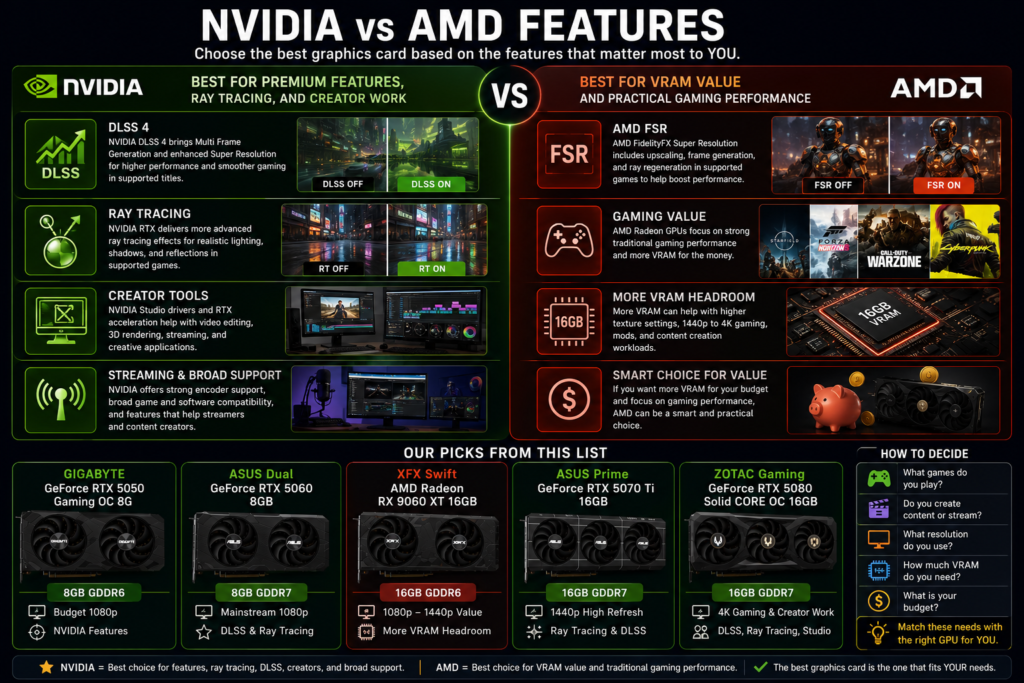
When choosing the best graphics card, the brand matters because NVIDIA and AMD focus on slightly different strengths. NVIDIA is usually stronger for buyers who care about DLSS, ray tracing, creator tools, and broad software support. AMD can be more attractive for buyers who care about VRAM value and practical gaming performance for the money.
In this article’s product list, the NVIDIA options include the GIGABYTE GeForce RTX 5050 Gaming OC 8G, ASUS Dual GeForce RTX 5060 8GB, ASUS Prime GeForce RTX 5070 Ti 16GB, and ZOTAC Gaming GeForce RTX 5080 Solid CORE OC 16GB. The AMD option is the XFX Swift AMD Radeon RX 9060 XT 16GB, which stands out mainly because it offers 16GB of VRAM in a more value-focused position.
DLSS, Ray Tracing, Creator Tools, and VRAM Value
NVIDIA is often easier to recommend if you play games that support DLSS, ray tracing, and other RTX features. NVIDIA describes DLSS 4 as bringing Multi Frame Generation and enhanced Super Resolution to GeForce RTX 50 Series GPUs, powered by fifth-generation Tensor Cores. That makes NVIDIA cards more attractive if your favorite games support these features.
NVIDIA may also be the better direction for creator workflows. NVIDIA Studio focuses on RTX GPU performance, AI acceleration, video editing, 3D rendering, livestreaming, and creator software support. This does not mean every creator must buy NVIDIA, but it does make RTX cards easier to recommend for users who rely on GPU-accelerated creative applications.
AMD’s main advantage in this list is VRAM value. The XFX Swift AMD Radeon RX 9060 XT 16GB gives buyers a 16GB option without moving directly into the higher-end NVIDIA cards. If you care more about traditional gaming, higher texture settings, and more memory headroom for 1080p to 1440p gaming, this AMD card is worth comparing.
AMD also has FidelityFX Super Resolution technology. AMD describes FSR as including upscaling, frame generation, and ray regeneration features in supported games. This gives AMD users a performance-enhancing feature set, though game support and image quality can vary by title and implementation.
| Feature Priority | Better Direction | Recommended Pick from This List | Why It Fits |
|---|---|---|---|
| Budget NVIDIA features | NVIDIA | GIGABYTE GeForce RTX 5050 Gaming OC 8G | Best for buyers who want a lower-cost RTX option for 1080p gaming and NVIDIA features. |
| Mainstream 1080p with DLSS support | NVIDIA | ASUS Dual GeForce RTX 5060 8GB | Better for users who want modern NVIDIA features in a mainstream gaming build. |
| VRAM value | AMD | XFX Swift AMD Radeon RX 9060 XT 16GB | Good for buyers who want 16GB VRAM headroom and value-focused 1080p to 1440p gaming. |
| 1440p gaming with ray tracing | NVIDIA | ASUS Prime GeForce RTX 5070 Ti 16GB | Better for higher settings, stronger feature support, and more performance headroom. |
| 4K gaming and creator work | NVIDIA | ZOTAC Gaming GeForce RTX 5080 Solid CORE OC 16GB | Best for high-end gaming, creative workloads, ray tracing, DLSS-supported games, and GPU-heavy tasks. |
If you mostly play esports titles or lighter games, the NVIDIA vs AMD decision may not matter as much as price, resolution, and system compatibility. But if you play newer AAA games, use ray tracing, stream, edit video, render 3D scenes, or care about upscaling features, the software ecosystem becomes more important.
If you want the safer feature-rich route, NVIDIA is usually the better fit. If you want more VRAM for the money and are focused mainly on traditional gaming value, AMD can be a smart alternative. The right choice depends on which features you will actually use.
Quick takeaway: choose NVIDIA if you care more about DLSS, ray tracing, creator tools, and premium feature support. Choose AMD if you care more about VRAM value and practical 1080p to 1440p gaming. The best graphics card is not just the fastest model; it is the one that matches your games, software, budget, and PC build.
Power Supply, Cooling, and Case Compatibility
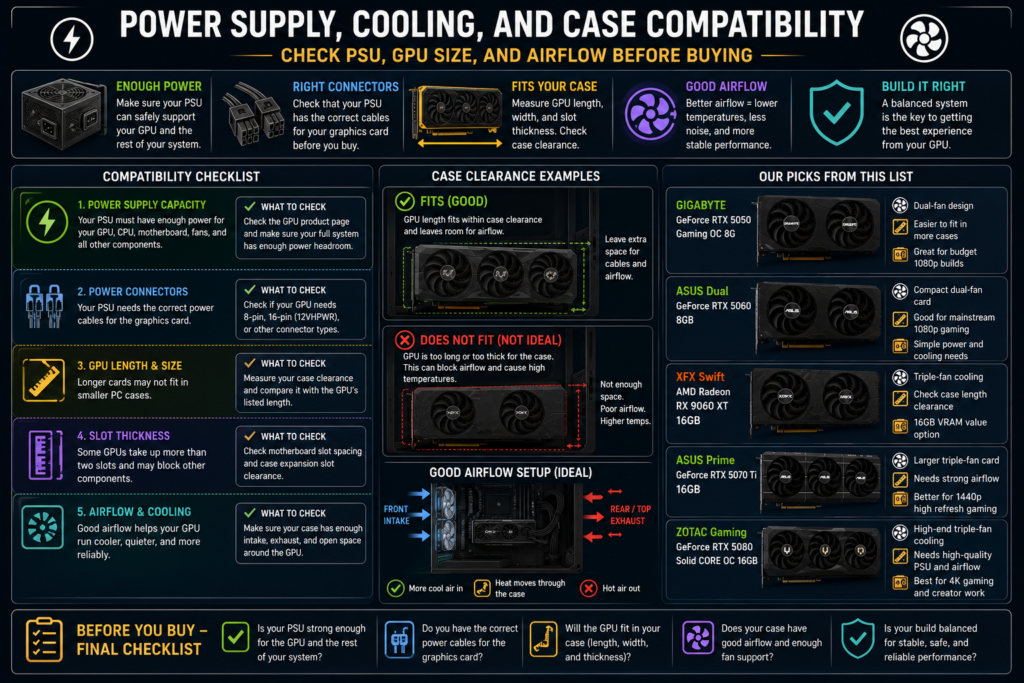
Choosing the best graphics card is not only about performance, VRAM, or brand. You also need to make sure your PC can physically and electrically support the GPU. A graphics card that looks perfect on paper can still become a bad purchase if your power supply is too weak, your case is too small, or your airflow is poor.
This is especially important when moving from a budget card to a higher-performance GPU. Entry-level cards are usually easier to fit into more systems, while higher-end cards may need more power, more space, better cooling, and cleaner cable management.
Check PSU, GPU Size, and Airflow Before Buying
The first thing to check is your power supply. Your PSU needs to support the graphics card and the rest of your system, including the CPU, motherboard, storage drives, fans, and other components. Do not choose a GPU only by performance level if your current power supply cannot safely support it.
You should also check the power connectors. Some graphics cards may use traditional 8-pin connectors, while higher-end models may require different power connector setups depending on the card design. Always compare the product page with your actual PSU cables before buying.
GPU size is another common issue. A dual-fan graphics card may fit more easily into standard or smaller builds, while a triple-fan graphics card may need more length, width, and slot clearance. Before buying, measure your case clearance and check whether the GPU will block other components or limit airflow.
| Compatibility Check | Why It Matters | What to Check Before Buying |
|---|---|---|
| Power supply capacity | A weak PSU can cause crashes, shutdowns, or unstable performance. | Check the GPU product page and make sure your full system has enough power headroom. |
| Power connectors | Your PSU must have the correct cables for the graphics card. | Check whether your GPU needs 8-pin, 16-pin, or another connector type. |
| GPU length | Longer cards may not fit inside smaller PC cases. | Measure your case clearance and compare it with the GPU’s listed size. |
| Slot thickness | Some GPUs take up more than two slots and may block nearby space. | Check motherboard slot spacing and case expansion slot clearance. |
| Airflow | Poor airflow can increase temperature, fan noise, and performance issues. | Make sure your case has enough intake, exhaust, and open space around the GPU. |
For a lower-cost or mainstream build, the GIGABYTE GeForce RTX 5050 Gaming OC 8G or ASUS Dual GeForce RTX 5060 8GB may be easier to plan around than larger high-end cards. They are better suited for buyers who want a simpler 1080p gaming upgrade without building a full high-end system.
For a value-focused 16GB card like the XFX Swift AMD Radeon RX 9060 XT 16GB, you should pay closer attention to case clearance and airflow because triple-fan designs may need more physical space. More cooling hardware can be helpful, but only if your case can actually support the card comfortably.
For higher-performance cards like the ASUS Prime GeForce RTX 5070 Ti 16GB and ZOTAC Gaming GeForce RTX 5080 Solid CORE OC 16GB, power and cooling checks become even more important. These cards make more sense in systems with better airflow, stronger power supply planning, and enough internal space.
Airflow should not be ignored. A case with good front intake, rear or top exhaust, clean dust filters, and enough room around the graphics card can help the GPU run cooler and quieter. Poor airflow can make even a strong graphics card feel less reliable during long gaming or creative sessions.
Quick takeaway: before buying a graphics card, check your PSU capacity, power connectors, GPU size, slot clearance, and airflow. The best graphics card is not just the one with the strongest specs; it is the one that fits your actual PC build safely and properly.
Common Graphics Card Buying Mistakes
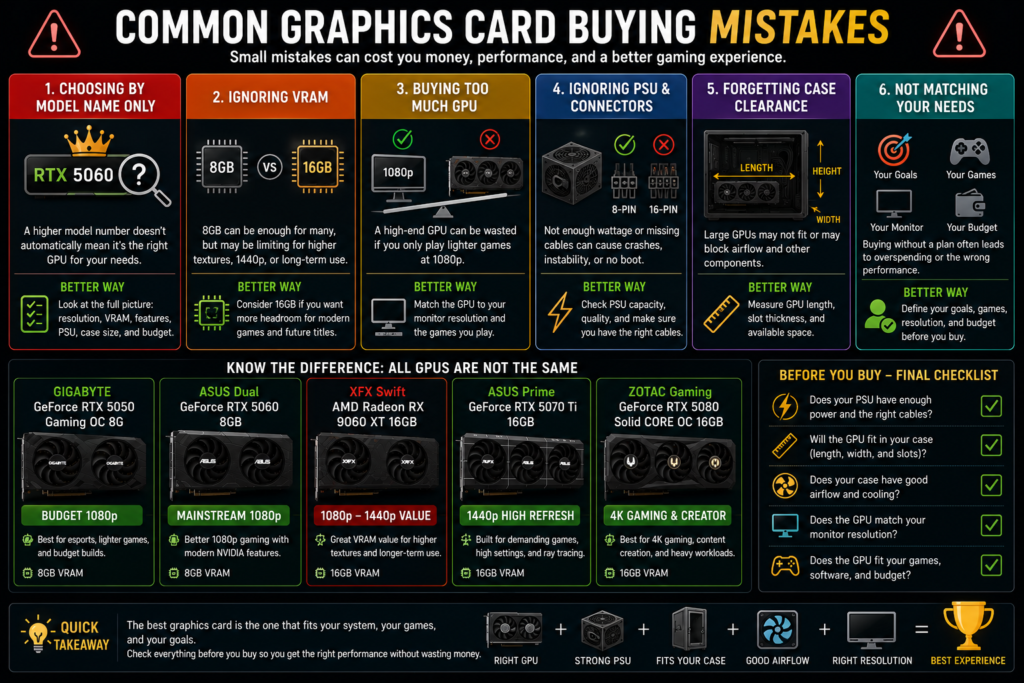
Choosing the best graphics card is not only about picking the newest model or the biggest number in the product name. Many buyers make mistakes because they focus on the GPU name first and forget to check resolution, VRAM, power supply, case size, airflow, and the type of games or software they actually use.
A graphics card can look powerful on paper but still be the wrong choice for your PC. It may be too expensive for your needs, too large for your case, too demanding for your power supply, or not the best fit for your monitor resolution. Avoiding these mistakes can help you buy a card that performs well without wasting money.
Choosing by Model Name Only
One of the biggest mistakes is choosing by model name only. A higher model number may suggest stronger performance, but that does not automatically mean it is the right graphics card for every buyer. You still need to check VRAM, resolution target, cooling design, power requirements, case compatibility, and feature support.
For example, the GIGABYTE GeForce RTX 5050 Gaming OC 8G may make sense for budget 1080p gaming and esports, while the ASUS Dual GeForce RTX 5060 8GB is a better mainstream 1080p option. But if you only look at the RTX name, you may miss the fact that both are still 8GB cards and may not be ideal for every long-term use case.
Another mistake is ignoring VRAM. The XFX Swift AMD Radeon RX 9060 XT 16GB may be worth comparing if you care about memory headroom and value-focused 1080p to 1440p gaming. Even if it is not the top NVIDIA option, its 16GB VRAM can matter for higher texture settings and longer-term flexibility.
Some buyers also buy more GPU than they need. If you only play lighter games at 1080p, a high-end card such as the ZOTAC Gaming GeForce RTX 5080 Solid CORE OC 16GB may be more than necessary. It is better suited for 4K gaming, creator workloads, and high-end builds that can support its power, cooling, and case requirements.
| Buying Mistake | Why It Can Be a Problem | Better Way to Choose |
|---|---|---|
| Choosing by model name only | A higher model number does not always mean it fits your monitor, budget, or PC build. | Compare resolution target, VRAM, features, PSU, case size, and airflow. |
| Ignoring VRAM | 8GB may be enough for many 1080p users, but it can feel limited for higher textures, 1440p, or long-term use. | Consider 16GB cards if you want more memory headroom. |
| Buying too much GPU | A high-end GPU may be wasted if you only play lighter 1080p games. | Match the card to your monitor resolution and actual games. |
| Ignoring PSU and connectors | Your system may not support the graphics card safely or reliably. | Check PSU capacity, cables, and connector requirements before buying. |
| Forgetting case clearance | Larger GPUs may not fit, or they may block airflow inside the case. | Measure GPU length, slot thickness, and available case space. |
Another common mistake is forgetting about the monitor. If you use a 1080p monitor, your priority should be smooth 1080p performance, not automatically buying a high-end 4K-focused card. If you use a 1440p high refresh monitor, the ASUS Prime GeForce RTX 5070 Ti 16GB may be a better match because it offers more performance and VRAM headroom than entry-level cards.
Buyers should also avoid treating every NVIDIA or AMD card as the same. NVIDIA may be better if you care about DLSS, ray tracing, creator tools, and broad software support. AMD may be more attractive if your priority is VRAM value and traditional gaming performance. The right brand depends on what you actually use.
Quick takeaway: do not choose a graphics card by model name only. The best graphics card is the one that matches your resolution, games, VRAM needs, power supply, case size, airflow, software features, and budget.
Frequently Asked Questions
How do I choose the best graphics card?
To choose the best graphics card, start with your main use case. Decide whether you need the GPU for gaming, creative work, streaming, general PC use, or a mix of these tasks. After that, match the card to your monitor resolution, VRAM needs, power supply, case size, airflow, and budget.
For this list, the GIGABYTE GeForce RTX 5050 Gaming OC 8G is better for budget 1080p gaming, the ASUS Dual GeForce RTX 5060 8GB is better for mainstream 1080p gaming, the XFX Swift AMD Radeon RX 9060 XT 16GB is better for value and VRAM headroom, the ASUS Prime GeForce RTX 5070 Ti 16GB is better for 1440p high refresh gaming, and the ZOTAC Gaming GeForce RTX 5080 Solid CORE OC 16GB is better for 4K gaming and creative work.
What graphics card is best for 1080p gaming?
For budget 1080p gaming, the GIGABYTE GeForce RTX 5050 Gaming OC 8G is the entry-level option in this list. It makes sense for esports titles, lighter games, casual gaming, and buyers who want a lower-cost NVIDIA card.
For stronger mainstream 1080p gaming, the ASUS Dual GeForce RTX 5060 8GB is the better choice. It is a better fit if you want stronger 1080p performance, modern NVIDIA features, and a more balanced gaming card for a standard PC build.
What graphics card is best for 1440p gaming?
For 1440p gaming, the ASUS Prime GeForce RTX 5070 Ti 16GB is the strongest fit in this list. It offers more performance and VRAM headroom than the 8GB cards, making it better for demanding games, higher settings, and high refresh rate 1440p monitors.
The XFX Swift AMD Radeon RX 9060 XT 16GB is also worth comparing if you want a more value-focused 16GB VRAM option for 1080p to 1440p gaming. The better choice depends on whether you care more about NVIDIA features or VRAM value.
What graphics card is best for 4K gaming?
For 4K gaming, the ZOTAC Gaming GeForce RTX 5080 Solid CORE OC 16GB is the high-end option in this list. It is better suited for 4K gaming, ray tracing, content creation, rendering, and heavier GPU workloads.
Before buying a high-end graphics card, check your power supply, power connectors, case clearance, airflow, seller reputation, warranty, and return policy. A strong GPU still needs the right PC build around it.
How much VRAM do I need?
How much VRAM you need depends on your resolution, game settings, texture quality, and workload. For many 1080p gaming setups, 8GB VRAM can still be usable, especially for esports, lighter games, and moderate settings.
If you want more long-term headroom for newer games, higher texture settings, 1440p gaming, 4K gaming, mods, or creative work, 16GB VRAM is more comfortable. In this list, the XFX Radeon RX 9060 XT, ASUS Prime RTX 5070 Ti, and ZOTAC RTX 5080 all offer 16GB VRAM.
Is 8GB VRAM enough in 2026?
8GB VRAM can still be enough in 2026 for many budget and mainstream 1080p gaming setups. It is more practical for esports titles, lighter games, older games, and users who are comfortable adjusting texture settings when needed.
The limitation is long-term headroom. Newer AAA games, higher texture settings, mods, 1440p gaming, and creative workloads may use more memory. If you want a graphics card that feels more flexible over time, a 16GB option may be a safer choice.
Is 16GB VRAM worth it?
16GB VRAM is worth considering if you want more headroom for modern games, higher textures, 1440p gaming, 4K gaming, creative work, or longer-term use. It can help the graphics card handle heavier memory demands more comfortably.
However, VRAM is not the only factor. GPU tier, memory type, software support, cooling, power supply, and system compatibility also matter. A 16GB card is useful, but it should still match your actual games, monitor, and PC build.
Should I buy NVIDIA or AMD?
Buy NVIDIA if you care more about DLSS, ray tracing, creator tools, streaming support, and broad software compatibility. In this list, the NVIDIA options are the RTX 5050, RTX 5060, RTX 5070 Ti, and RTX 5080.
Buy AMD if you care more about VRAM value and practical gaming performance for the money. In this list, the XFX Swift AMD Radeon RX 9060 XT 16GB is the AMD option and may be a smart choice if you want 16GB VRAM for 1080p to 1440p gaming.
How do I know if a graphics card fits my PC?
To know if a graphics card fits your PC, check the GPU length, slot thickness, power connector position, and your case’s maximum GPU clearance. Do not assume every GPU will fit just because your motherboard has a PCIe slot.
You should also check airflow. A graphics card may physically fit inside your case but still run hotter or louder if there is not enough open space around it. For larger dual-fan or triple-fan cards, case clearance and airflow are important buying factors.
Should I upgrade my power supply for a new graphics card?
You may need to upgrade your power supply if your current PSU does not have enough capacity, the correct power connectors, or enough headroom for your full system. A graphics card upgrade can increase total system power needs, especially with higher-end GPUs.
Before buying, check the GPU product page, your PSU wattage, available cables, CPU power needs, and the rest of your system. The best graphics card for your needs should also be a card your power supply can support safely.
Final Thought
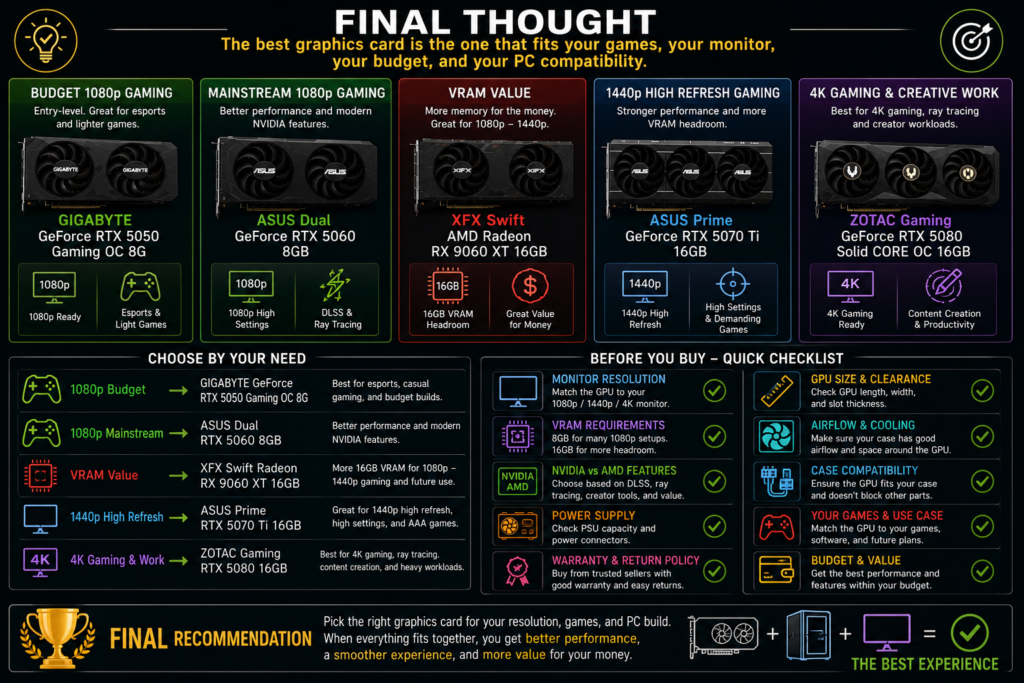
Choosing the best graphics card is not about buying the newest or most expensive GPU. It is about matching the card to your real use case, monitor resolution, VRAM needs, power supply, case size, airflow, and long-term upgrade plans.
If you mainly play esports titles, lighter games, or want a lower-cost 1080p gaming upgrade, the GIGABYTE GeForce RTX 5050 Gaming OC 8G is the entry-level option in this list. If you want a stronger mainstream 1080p card with modern NVIDIA features, the ASUS Dual GeForce RTX 5060 8GB is the better fit.
If your priority is VRAM value and more memory headroom, the XFX Swift AMD Radeon RX 9060 XT 16GB is worth comparing. It may be a smart option for buyers who want 16GB VRAM for 1080p to 1440p gaming, higher texture settings, and longer-term flexibility.
If you are building for 1440p high refresh gaming, demanding games, and stronger performance headroom, the ASUS Prime GeForce RTX 5070 Ti 16GB is the better match. For 4K gaming, content creation, rendering, ray tracing, and heavier GPU workloads, the ZOTAC Gaming GeForce RTX 5080 Solid CORE OC 16GB is the high-end choice in this lineup.
Before buying, do not only compare model names. Check your monitor resolution, VRAM requirements, NVIDIA vs AMD features, PSU capacity, power connectors, GPU size, case clearance, airflow, seller reputation, warranty, and return policy. A powerful graphics card still needs the right PC build around it.
Final recommendation: choose the RTX 5050 for budget 1080p gaming, the RTX 5060 for mainstream 1080p gaming, the RX 9060 XT 16GB for VRAM value, the RTX 5070 Ti 16GB for 1440p high refresh gaming, and the RTX 5080 16GB for 4K gaming or creative work. The best graphics card is the one that fits your games, your monitor, your budget, and your PC compatibility.