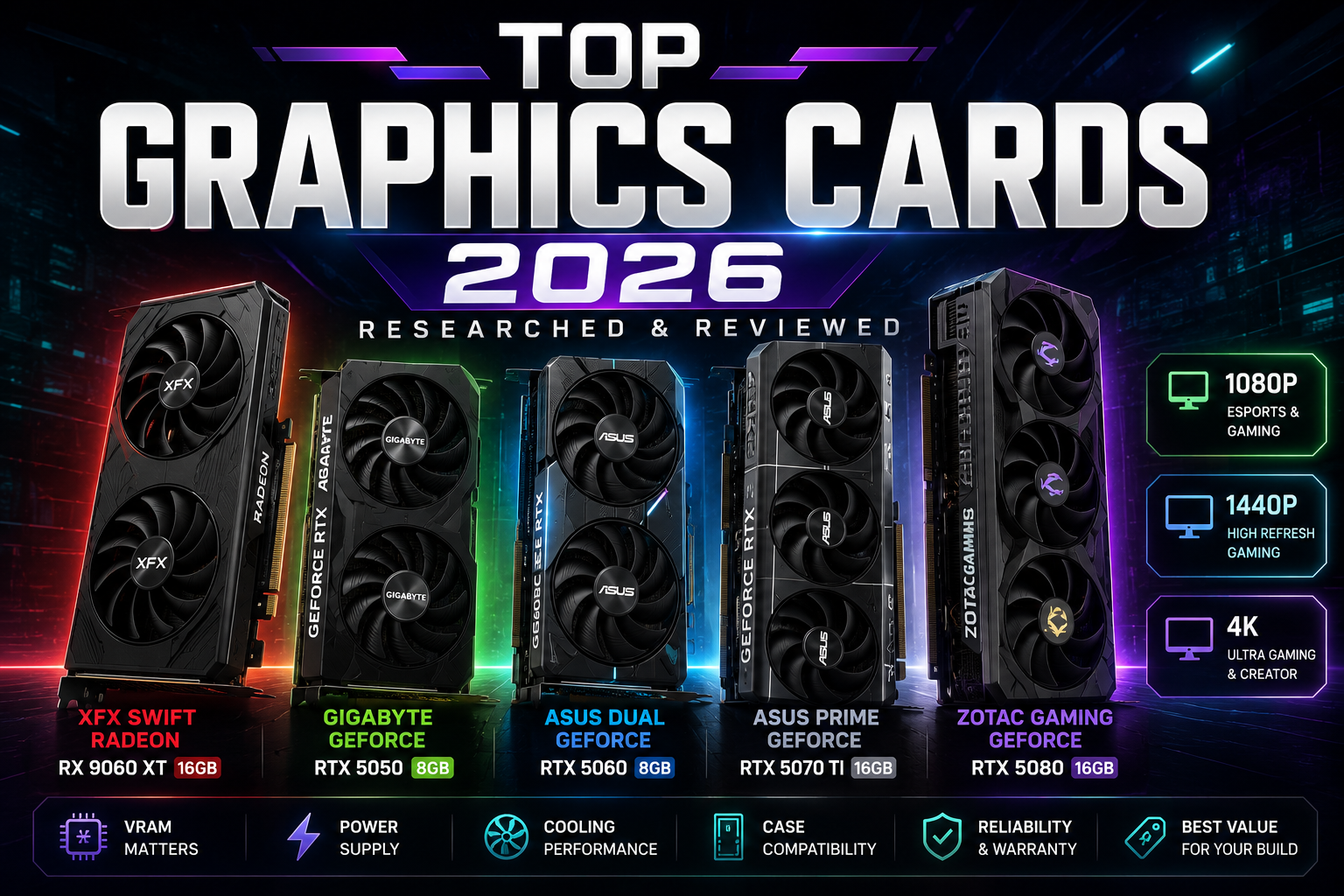
Table of Contents
Quick Comparison Table
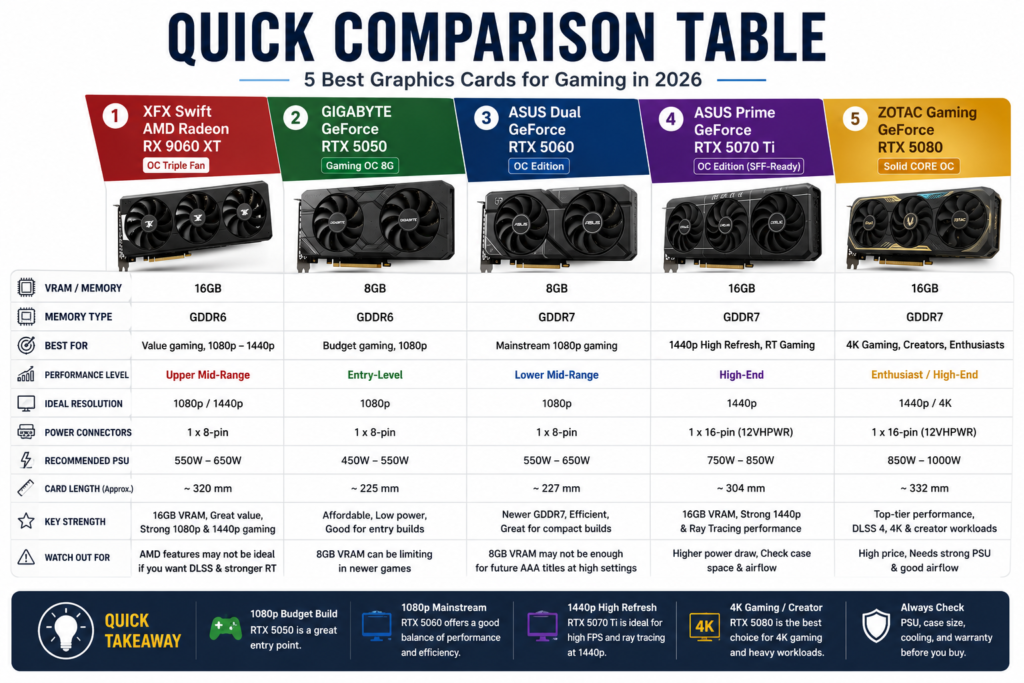
If you are looking for a new graphics card in 2026, the best choice depends on your budget, monitor resolution, power supply, case size, and whether you care more about gaming, ray tracing, upscaling, or creative work.
This quick comparison table gives you a simple overview of the five graphics cards in this researched list. The goal is to help you quickly understand which GPU fits budget gaming, 1080p gaming, 1440p gaming, 4K gaming, or heavier creative workloads.
| Graphics Card | VRAM / Memory | Best For | Why It Stands Out | Watch Out For |
|---|---|---|---|---|
| XFX Swift AMD Radeon RX 9060 XT OC Triple Fan Gaming Edition | 16GB GDDR6 | Value-focused gaming, 1080p to 1440p, and buyers who want more VRAM | It offers 16GB of VRAM in this list, which can be useful for modern games, higher texture settings, and longer-term usability. | AMD cards may not be the first choice if your priority is NVIDIA-specific features such as DLSS or stronger ray tracing support. |
| GIGABYTE GeForce RTX 5050 Gaming OC 8G | 8GB GDDR6 | Budget gaming, entry-level builds, and casual 1080p users | It is the most entry-level option in this list and may fit buyers who want a newer NVIDIA RTX card without moving into higher-priced GPUs. | 8GB VRAM can be limiting in some newer games, higher textures, or heavier creative workloads. |
| ASUS Dual NVIDIA GeForce RTX 5060 OC Edition | 8GB GDDR7 | Mainstream 1080p gaming and compact gaming PCs | It combines a newer RTX 50-series GPU with GDDR7 memory and a dual-fan design that may fit smaller or cleaner builds. | Like other 8GB cards, it may not be ideal for users who want higher VRAM headroom for demanding games or creative work. |
| ASUS SFF-Ready Prime NVIDIA GeForce RTX 5070 Ti OC Edition | 16GB GDDR7 | High-refresh 1440p gaming, stronger ray tracing, and compact high-performance builds | It has 16GB of VRAM and is positioned as a stronger choice for users who want more performance headroom than entry-level or mainstream GPUs. | Check your power supply, case clearance, and airflow before buying, especially for smaller PC cases. |
| ZOTAC Gaming GeForce RTX 5080 Solid CORE OC | 16GB GDDR7 | 4K gaming, high-end gaming PCs, ray tracing, and creative workloads | It is the highest-end option in this list and is best suited for users who want stronger performance for demanding games and heavier workloads. | It may require a stronger power supply, better case airflow, and a higher budget. Always check current seller, warranty, and return policy. |
Quick takeaway: choose the RTX 5050 or RTX 5060 if you want a simpler 1080p gaming upgrade, the RX 9060 XT if you want more VRAM at a value-focused level, the RTX 5070 Ti if you want stronger 1440p performance with 16GB VRAM, and the RTX 5080 if you are building a high-end gaming or creator PC.
Top Graphics Cards 2026: Our Researched Picks
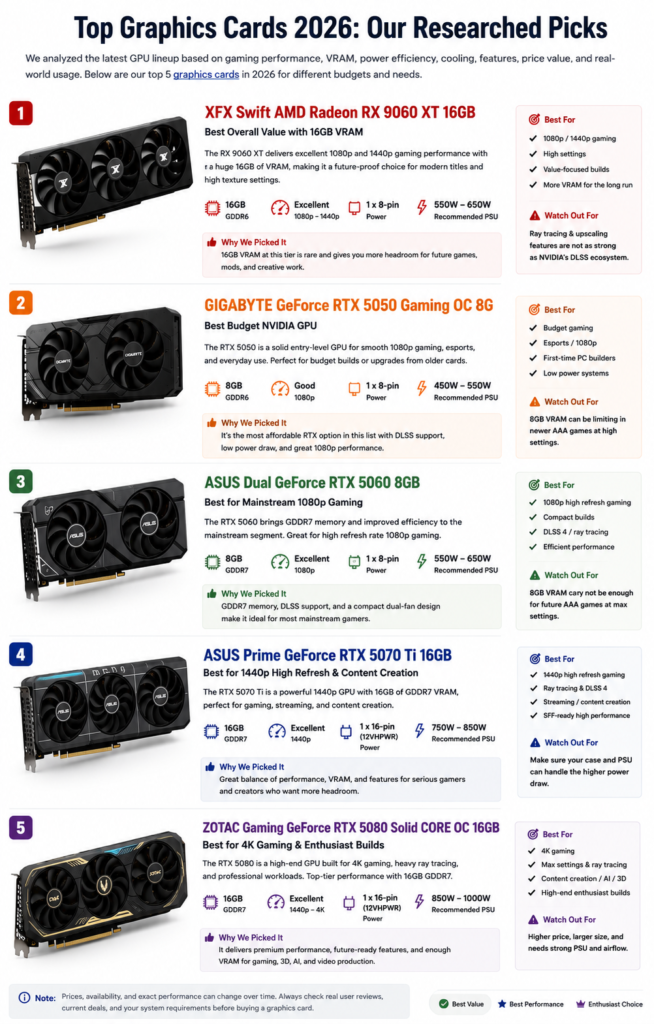
Choosing the right graphics card in 2026 depends on what kind of PC you are building. A budget gaming PC does not need the same GPU as a 4K gaming setup, and a compact case may not handle the same card as a full-size tower with stronger airflow.
For this researched list, we selected five graphics cards that cover different buyer needs: entry-level gaming, mainstream 1080p gaming, value-focused VRAM, stronger 1440p performance, and high-end 4K or creator-focused use. The goal is not to say one card is perfect for everyone, but to help you match the GPU to your monitor, games, case, power supply, and budget.
XFX Swift AMD Radeon RX 9060 XT 16GB
The XFX Swift AMD Radeon RX 9060 XT OC Triple Fan Gaming Edition is the AMD option in this list and stands out because of its 16GB GDDR6 memory. That makes it interesting for buyers who want more VRAM headroom without immediately moving into a higher-end NVIDIA card.
This graphics card makes the most sense for value-focused gamers who play at 1080p or 1440p and want more memory for modern games, higher texture settings, and longer-term usability. The triple-fan design may also appeal to users who care about cooling, though you should still check your case clearance before buying.
The main trade-off is ecosystem. If you specifically want NVIDIA features like DLSS, stronger ray tracing support in many games, or CUDA-based creative workflows, this AMD card may not be your first choice. But if your priority is VRAM and gaming value, the RX 9060 XT is one of the more practical picks in this lineup.
GIGABYTE GeForce RTX 5050 Gaming OC 8G
The GIGABYTE GeForce RTX 5050 Gaming OC 8G is the entry-level NVIDIA option in this researched list. It is best suited for buyers who want a newer RTX card for a budget gaming PC, casual 1080p gaming, esports titles, or a simple upgrade from an older GPU.
Because this card uses 8GB of GDDR6 memory, it is better viewed as a practical 1080p card rather than a heavy 1440p or 4K gaming card. It may be enough for lighter games, competitive titles, and general desktop use, but buyers should not expect it to be the best choice for demanding AAA games at high settings.
The biggest advantage is accessibility. If your budget is limited and you want to stay in the NVIDIA ecosystem, the RTX 5050 can be a reasonable starting point. The main limitation is VRAM headroom, especially as newer games continue to use more memory at higher texture settings.
ASUS Dual GeForce RTX 5060 8GB
The ASUS Dual NVIDIA GeForce RTX 5060 8GB GDDR7 OC Edition is a mainstream option for users who want a newer RTX 50-series card without going into high-end pricing. Its dual-fan design also makes it easier to consider for cleaner builds or smaller cases, depending on your available space.
This graphics card is best for 1080p gaming, lighter 1440p use, and buyers who want NVIDIA features such as DLSS 4 support. It can be a better fit than the RTX 5050 if you want a stronger mainstream gaming card while still staying below higher-end GPUs.
The main concern is still the 8GB VRAM limit. For many 1080p gamers, that may be acceptable. But if you plan to play newer AAA games at high textures, use mods, or keep the card for several years, you should think carefully about whether 8GB gives you enough headroom.
ASUS Prime GeForce RTX 5070 Ti 16GB
The ASUS SFF-Ready Prime NVIDIA GeForce RTX 5070 Ti 16GB GDDR7 OC Edition is positioned for buyers who want a stronger GPU for high-refresh 1440p gaming, heavier games, ray tracing, and more performance headroom than entry-level or mainstream cards.
Its 16GB GDDR7 memory gives it more long-term flexibility than the 8GB cards in this list. That can matter if you play newer games, use higher texture settings, stream, edit video, or want a card that feels less limited over time. The SFF-ready positioning also makes it interesting for compact but powerful builds, although case clearance and airflow still matter.
This card is not the cheapest option, so it makes the most sense for buyers who already have a strong CPU, enough power supply capacity, and a monitor that can take advantage of better GPU performance. If you only play light 1080p games, this may be more card than you need.
ZOTAC Gaming GeForce RTX 5080 Solid CORE OC 16GB
The ZOTAC Gaming GeForce RTX 5080 Solid CORE OC 16GB GDDR7 is the high-end option in this lineup. It is the card to consider if you are building a powerful gaming PC for 4K gaming, high refresh rates, ray tracing, DLSS 4-supported games, or demanding creative workloads.
Compared with the lower-tier cards in this list, the RTX 5080 is better suited for users who do not want to compromise as much on settings, resolution, or performance headroom. It can also make sense for creators who use GPU-accelerated software and want a stronger card for editing, rendering, or AI-related workloads.
The trade-off is cost, power, and case requirements. A high-end GPU like this needs better airflow, a suitable power supply, and enough physical space inside the PC case. Before buying, check the seller, return policy, warranty, power connector requirements, and whether your case can support the card size.
Quick takeaway: choose the RTX 5050 if you want the lowest-cost NVIDIA option in this list, the RTX 5060 if you want a stronger mainstream 1080p card, the RX 9060 XT if you want more VRAM at a value-focused level, the RTX 5070 Ti if you want stronger 1440p performance with 16GB VRAM, and the RTX 5080 if you are building a high-end 4K gaming or creator PC.
Best Graphics Card for Different Needs
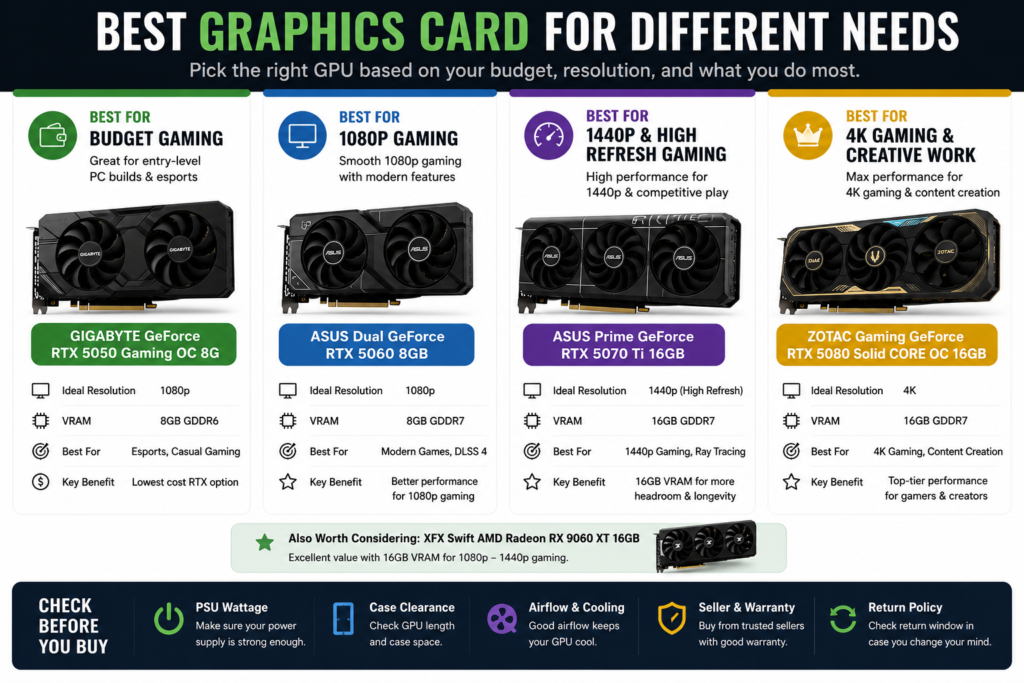
The best graphics card is not always the most expensive one. The right choice depends on your monitor resolution, game type, budget, power supply, case size, and whether you need NVIDIA features, AMD value, ray tracing, or stronger VRAM headroom.
For most buyers, it is better to choose a GPU based on actual use case instead of only looking at the model number. A budget 1080p gaming PC, a high-refresh 1440p setup, and a 4K creator workstation all need different levels of graphics performance.
Best for Budget Gaming
For budget gaming, the GIGABYTE GeForce RTX 5050 Gaming OC 8G is the most practical entry-level NVIDIA option in this list. It makes sense for buyers who want a newer RTX card for esports games, casual 1080p gaming, and a lower-cost PC upgrade.
The RTX 5050 is not the card to choose if you want high-end 1440p or 4K gaming. Its 8GB GDDR6 memory can become limiting in newer AAA games, especially with higher texture settings. But if your goal is simple 1080p gaming on a tighter budget, it can be a reasonable starting point.
Best for 1080p Gaming
For mainstream 1080p gaming, the ASUS Dual NVIDIA GeForce RTX 5060 8GB GDDR7 OC Edition is the better fit. It gives you a stronger NVIDIA option than the RTX 5050 while still staying below higher-end GPU pricing.
This graphics card is best for users who play at 1080p, want good performance in modern games, and care about NVIDIA features such as DLSS support. The dual-fan design may also be useful for smaller or cleaner PC builds, but you should still check GPU length and case airflow before buying.
The main limitation is VRAM. Like the RTX 5050, the RTX 5060 has 8GB of memory. That may be fine for many 1080p gamers, but users who want long-term headroom, high texture settings, heavy mods, or creative workloads may want to consider a 16GB card instead.
Best for 1440p and High Refresh Rate Gaming
For 1440p gaming and high refresh rate setups, the ASUS SFF-Ready Prime NVIDIA GeForce RTX 5070 Ti 16GB GDDR7 OC Edition is the strongest fit in this category. It offers more performance headroom than entry-level and mainstream cards, while also giving you 16GB of VRAM.
This makes it a better choice for gamers using 1440p monitors, higher refresh rates, ray tracing, heavier games, or more demanding graphics settings. The 16GB memory also gives it more flexibility for newer games and multitasking compared with 8GB cards.
Before buying, check your power supply, power connector, case clearance, and airflow. A stronger graphics card can produce more heat and may need more space than a budget GPU. This is especially important if you are building inside a smaller case.
Best for 4K Gaming and Creative Work
For 4K gaming, demanding graphics settings, and heavier creative workloads, the ZOTAC Gaming GeForce RTX 5080 Solid CORE OC 16GB GDDR7 is the high-end choice in this list. It is the best fit for users who want stronger performance headroom and are building a more powerful gaming or creator PC.
This graphics card makes the most sense for 4K gaming, ray tracing, content creation, video editing, rendering, and GPU-heavy workloads. If you use a high-resolution monitor or want to keep graphics settings higher for longer, the RTX 5080 is the most performance-focused option here.
The trade-off is cost, power, and system requirements. A card like this needs a strong enough PSU, proper airflow, and enough physical space inside the case. Before buying, check the current seller, return policy, warranty, GPU length, power connector requirements, and whether your system can support it.
Quick takeaway: choose the RTX 5050 for budget gaming, the RTX 5060 for mainstream 1080p gaming, the RTX 5070 Ti for stronger 1440p and high refresh rate gaming, and the RTX 5080 for 4K gaming or creative work. If you want more VRAM at a value-focused level, also compare the XFX Radeon RX 9060 XT 16GB before making your final decision.
Gaming Performance, VRAM, and Resolution

When choosing a graphics card, gaming performance is not only about the GPU model name. Resolution, VRAM, game settings, ray tracing, upscaling, CPU balance, and cooling can all affect the real experience. A card that feels smooth at 1080p may not be the best fit for 1440p high refresh gaming or 4K gaming.
For most buyers, the easiest way to narrow down the right GPU is to start with the monitor. If you play on a 1080p monitor, you may not need a high-end graphics card. If you use a 1440p high refresh monitor or a 4K display, you should look for stronger performance, more VRAM headroom, and better cooling.
Why VRAM Matters for Modern Games
VRAM is the memory on the graphics card. It helps store textures, frame buffers, game assets, and visual data while a game is running. When a game uses more VRAM than your GPU has available, performance can become less stable, especially at higher resolutions or higher texture settings.
In this researched list, the 8GB cards such as the GIGABYTE GeForce RTX 5050 Gaming OC 8G and ASUS Dual GeForce RTX 5060 8GB make the most sense for 1080p gaming and lighter workloads. They can be practical choices if you mainly play esports titles, lighter games, or use moderate settings.
The 16GB cards, including the XFX Swift AMD Radeon RX 9060 XT 16GB, ASUS Prime GeForce RTX 5070 Ti 16GB, and ZOTAC Gaming GeForce RTX 5080 16GB, give more memory headroom. That can be useful for higher texture settings, 1440p gaming, 4K gaming, creative work, and longer-term usability.
| Gaming Target | Recommended GPU Level | VRAM Consideration | Best Match from This List |
|---|---|---|---|
| Budget 1080p gaming | Entry-level RTX card | 8GB can be acceptable for lighter games and moderate settings. | GIGABYTE GeForce RTX 5050 Gaming OC 8G |
| Mainstream 1080p gaming | Stronger mainstream GPU | 8GB may work, but settings and game type matter. | ASUS Dual GeForce RTX 5060 8GB |
| Value-focused 1080p to 1440p gaming | Mid-range card with more VRAM | 16GB gives more headroom for textures and newer games. | XFX Swift AMD Radeon RX 9060 XT 16GB |
| 1440p high refresh gaming | Higher-performance GPU | 16GB is more comfortable for demanding games and higher settings. | ASUS Prime GeForce RTX 5070 Ti 16GB |
| 4K gaming and creative work | High-end GPU | 16GB helps with higher resolution, heavier workloads, and more demanding settings. | ZOTAC Gaming GeForce RTX 5080 16GB |
Resolution has a direct impact on GPU demand. 1080p is easier to run, so a lower-cost graphics card may be enough for many players. 1440p requires more GPU power and more memory headroom, especially if you want higher refresh rates. 4K is much more demanding and usually needs a stronger GPU, better cooling, and a stronger power supply.
Texture settings are another reason VRAM matters. Higher texture quality can make games look sharper, but it also uses more video memory. If you want to keep texture settings higher in newer games, a 16GB graphics card may feel more flexible than an 8GB card.
Ray tracing and upscaling also affect the buying decision. NVIDIA cards may be more attractive if you care about DLSS-supported games, ray tracing features, or creator software that benefits from NVIDIA acceleration. AMD cards may be more attractive if your priority is VRAM value and traditional rasterized gaming performance.
Quick takeaway: choose your graphics card based on your monitor first. 8GB cards are better suited for budget or mainstream 1080p gaming, while 16GB cards are better for higher settings, 1440p gaming, 4K gaming, creative work, and longer-term flexibility.
NVIDIA vs AMD: Which Graphics Card Should You Choose?

When comparing NVIDIA vs AMD, the best graphics card depends on what you care about most. NVIDIA is usually the better choice if you want stronger ray tracing support, DLSS features, and creator-focused software support. AMD is usually more attractive if you want strong traditional gaming value, more VRAM for the money, and a practical gaming-focused upgrade.
For this list, the NVIDIA options include the GIGABYTE GeForce RTX 5050, ASUS Dual GeForce RTX 5060, ASUS Prime GeForce RTX 5070 Ti, and ZOTAC Gaming GeForce RTX 5080. The AMD option is the XFX Swift Radeon RX 9060 XT 16GB, which stands out mainly because it offers 16GB of VRAM in a value-focused position.
Ray Tracing, Upscaling, and Driver Features
NVIDIA cards are often easier to recommend for buyers who care about ray tracing, AI upscaling, and supported creator workflows. NVIDIA’s DLSS technology uses AI to improve performance and image quality in supported games, and DLSS 4 is tied closely to newer GeForce RTX 50 Series GPUs.
If you play many games that support DLSS, ray tracing, or NVIDIA Reflex-style gaming features, an RTX graphics card may be the better fit. In this article’s product list, the RTX 5060 is the mainstream 1080p option, the RTX 5070 Ti is the stronger 1440p option, and the RTX 5080 is the high-end choice for 4K gaming and heavier creative work.
AMD also has upscaling technology through FidelityFX Super Resolution. AMD describes FSR as a technology family that includes upscaling, frame generation, and ray regeneration features in supported games.
The AMD advantage is usually value and VRAM. The XFX Radeon RX 9060 XT 16GB may be a good fit if you want more memory headroom for modern games, higher texture settings, and 1080p to 1440p gaming without focusing mainly on NVIDIA-only features.
| Buyer Priority | Better Direction | Why | Best Match from This List |
|---|---|---|---|
| Budget NVIDIA gaming | NVIDIA | Good for buyers who want a newer RTX card at a lower entry point. | GIGABYTE GeForce RTX 5050 Gaming OC 8G |
| Mainstream 1080p gaming | NVIDIA | Better if you want RTX features, DLSS support, and a stronger mainstream option. | ASUS Dual GeForce RTX 5060 8GB |
| More VRAM for value | AMD | Useful if you want 16GB VRAM at a more value-focused level. | XFX Swift AMD Radeon RX 9060 XT 16GB |
| 1440p high refresh gaming | NVIDIA | Better for stronger performance headroom, ray tracing, and 16GB VRAM. | ASUS Prime GeForce RTX 5070 Ti 16GB |
| 4K gaming and creative work | NVIDIA | Best fit for high-end gaming, DLSS-supported games, and GPU-heavy workloads. | ZOTAC Gaming GeForce RTX 5080 Solid CORE OC 16GB |
If your main goal is competitive gaming, esports, and normal 1080p play, you do not always need the most expensive graphics card. An RTX 5050 or RTX 5060 may be enough depending on your games and settings. If you want more VRAM and are less focused on NVIDIA-specific features, the Radeon RX 9060 XT 16GB is worth comparing.
If your goal is high-refresh 1440p gaming, ray tracing, streaming, or heavier games, the RTX 5070 Ti is the better fit in this list. If your goal is 4K gaming, creator work, rendering, or a high-end PC build, the RTX 5080 is the strongest choice here.
Quick takeaway: choose NVIDIA if you care more about DLSS, ray tracing, creator software support, and premium feature support. Choose AMD if you care more about VRAM value and practical 1080p to 1440p gaming. The right choice is not only about brand; it is about the games you play, your monitor resolution, your budget, and your PC build.
Power, Cooling, and Case Compatibility

A graphics card is not something you should buy by looking at performance alone. Before upgrading, you also need to check your power supply, case space, airflow, power connectors, and cooling setup. A strong GPU can still become a bad fit if your PC case is too small or your power supply cannot support it properly.
This is especially important when moving from an entry-level card to a higher-performance GPU. Bigger graphics cards may need more power, more cooling, more slot space, and better airflow. Checking these details before buying can help you avoid returns, overheating, noise, and installation problems.
Check PSU, GPU Length, and Airflow Before Buying
The first thing to check is your power supply. Do not only look at the GPU itself. Your full system also uses power, including the CPU, motherboard, storage drives, fans, and other components. A higher-end graphics card may need more power headroom than a budget card, especially during gaming or creative workloads.
Also check the power connector requirement. Some graphics cards may use traditional 8-pin power connectors, while higher-end models may use a different power connector depending on the card design. Before buying, compare the product listing with your current PSU cables and make sure your power supply can support the card safely.
| Compatibility Check | Why It Matters | What to Do Before Buying |
|---|---|---|
| PSU capacity | A weak power supply can cause crashes, shutdowns, or unstable performance. | Check the GPU listing and make sure your PSU has enough total system power headroom. |
| Power connectors | Your PSU must have the correct cables for the graphics card. | Confirm whether the card needs 8-pin, 16-pin, or another connector type based on the product page. |
| GPU length | Longer cards may not fit inside smaller PC cases. | Measure your case clearance and compare it with the card’s listed dimensions. |
| Slot thickness | Some cards take up more than two slots and may block nearby components. | Check whether your motherboard and case have enough slot space. |
| Airflow | Poor airflow can increase temperature, fan noise, and performance throttling. | Make sure your case has proper intake, exhaust, and enough room around the GPU. |
GPU length is one of the easiest details to miss. A triple-fan graphics card may offer better cooling, but it can also be longer and thicker than a compact dual-fan model. For example, a smaller build may be easier with a dual-fan card like the ASUS Dual GeForce RTX 5060, while larger cards such as the XFX Radeon RX 9060 XT, ASUS Prime RTX 5070 Ti, or ZOTAC RTX 5080 may need more case clearance.
Cooling is also a real buying factor. If your case has poor airflow, even a powerful graphics card may run hotter and louder than expected. A case with front intake fans, rear or top exhaust, clean dust filters, and enough open space around the GPU can help keep temperatures more stable.
For high-end cards, airflow and PSU quality matter even more. A GPU like the ZOTAC GeForce RTX 5080 should not be treated like a simple drop-in upgrade for every PC. It is better suited for a system with a strong power supply, good cooling, enough physical space, and a case designed for high-performance hardware.
If you are not sure whether a card fits your PC, check three things before buying: your PSU wattage and cables, your case GPU clearance, and your case airflow. These checks are just as important as comparing VRAM or gaming performance.
Quick takeaway: before buying a graphics card, check PSU capacity, power connectors, GPU length, slot thickness, and airflow. A card that looks powerful on paper still needs the right PC case and power setup to work properly.
Buying Advice Based on Budget and Use Case
The best graphics card for you depends on how much you want to spend and what you actually do with your PC. A budget gamer, a 1080p esports player, a 1440p high-refresh gamer, and a 4K creator do not need the same GPU.
Instead of only choosing the newest or most expensive model, start with your use case. Think about your monitor resolution, the games you play, your power supply, your case size, and whether you need NVIDIA features, AMD value, or more VRAM for longer-term flexibility.
| Use Case | Best Direction | Recommended Pick from This List | Why It Makes Sense |
|---|---|---|---|
| Lowest-cost gaming upgrade | Budget NVIDIA card | GIGABYTE GeForce RTX 5050 Gaming OC 8G | Best for entry-level 1080p gaming, esports, and simple PC upgrades. |
| Mainstream 1080p gaming | Stronger 1080p NVIDIA card | ASUS Dual GeForce RTX 5060 8GB | A better fit for users who want a newer mainstream RTX card with DLSS support. |
| Value-focused gaming with more VRAM | AMD 16GB option | XFX Swift AMD Radeon RX 9060 XT 16GB | Good for buyers who want more VRAM headroom for 1080p to 1440p gaming. |
| 1440p high refresh gaming | Higher-performance 16GB NVIDIA card | ASUS Prime GeForce RTX 5070 Ti 16GB | Better for demanding games, ray tracing, higher settings, and stronger 1440p performance. |
| 4K gaming and creative work | High-end GPU | ZOTAC Gaming GeForce RTX 5080 Solid CORE OC 16GB | Best for high-end gaming PCs, 4K gaming, ray tracing, content creation, and heavier workloads. |
If your budget is tight, the RTX 5050 is the easiest starting point in this list. It is not designed for premium gaming, but it can make sense for esports, lighter games, casual 1080p use, and users upgrading from an older low-end GPU.
If you want a more balanced 1080p gaming card, the RTX 5060 is the better choice. It gives you a stronger mainstream NVIDIA option while still staying below the higher-end cards. It is a better fit if you want modern features but do not need a full 1440p or 4K setup.
If you care more about VRAM value, the RX 9060 XT 16GB deserves attention. Its 16GB memory makes it useful for buyers who want more headroom for newer games, higher texture settings, and 1080p to 1440p gaming. The trade-off is that it may not be the first choice if you specifically want NVIDIA features such as DLSS or CUDA-based creator workflows.
If you already have a 1440p high-refresh monitor, the RTX 5070 Ti is the more serious gaming option. It gives you stronger performance headroom and 16GB of VRAM, which makes it more suitable for demanding games, ray tracing, and higher settings.
If you are building a high-end PC for 4K gaming, content creation, rendering, or GPU-heavy workloads, the RTX 5080 is the strongest option in this list. However, it also requires more careful planning. Check your PSU, case clearance, airflow, power connector, seller, warranty, and return policy before buying.
Quick takeaway: buy based on your actual use case. Choose the RTX 5050 for budget 1080p gaming, the RTX 5060 for mainstream 1080p gaming, the RX 9060 XT for value and 16GB VRAM, the RTX 5070 Ti for 1440p high refresh gaming, and the RTX 5080 for 4K gaming or creative work.
Frequently Asked Questions
What is the best graphics card for gaming in 2026?
The best graphics card for gaming in 2026 depends on your budget, monitor resolution, and the types of games you play. There is no single best GPU for every buyer because 1080p gaming, 1440p high refresh gaming, 4K gaming, and creative work all need different levels of performance.
For this researched list, the GIGABYTE GeForce RTX 5050 Gaming OC 8G is the budget NVIDIA option, the ASUS Dual GeForce RTX 5060 8GB is the mainstream 1080p option, the XFX Radeon RX 9060 XT 16GB is the value-focused 16GB VRAM option, the ASUS Prime GeForce RTX 5070 Ti 16GB is better for 1440p high refresh gaming, and the ZOTAC GeForce RTX 5080 16GB is the high-end pick for 4K gaming and creative work.
How much VRAM do I need for gaming?
For many 1080p gaming setups, 8GB of VRAM can still be usable, especially for esports titles, lighter games, and moderate settings. However, newer AAA games, high texture settings, mods, 1440p gaming, and 4K gaming can use more video memory.
If you want better long-term flexibility, 16GB of VRAM is more comfortable. In this list, the XFX Radeon RX 9060 XT, ASUS Prime RTX 5070 Ti, and ZOTAC RTX 5080 all offer 16GB memory, making them better choices for buyers who want more VRAM headroom.
Is 8GB VRAM enough for a graphics card?
8GB VRAM can be enough for budget and mainstream 1080p gaming, but it depends on the games and settings. If you mostly play esports games, older titles, or lighter games, an 8GB graphics card may still be practical.
The limitation appears when you want newer AAA games, higher texture packs, heavy mods, 1440p gaming, or longer-term use. In those cases, 8GB may feel more restrictive over time, so a 16GB card may be worth considering.
Is 16GB VRAM better for gaming and creative work?
Yes, 16GB VRAM is generally better for higher settings, 1440p gaming, 4K gaming, heavier textures, creative workloads, and longer-term flexibility. It gives the graphics card more memory headroom when games or applications need more video memory.
However, VRAM is not the only factor. GPU performance, memory type, cooling, power limits, driver support, and software features also matter. A 16GB graphics card is useful, but you should still choose based on your full use case, not VRAM alone.
Should I choose NVIDIA or AMD for a graphics card?
Choose NVIDIA if you care more about DLSS support, ray tracing, creator software compatibility, and premium RTX features. NVIDIA cards in this list include the RTX 5050, RTX 5060, RTX 5070 Ti, and RTX 5080.
Choose AMD if you care more about VRAM value and practical gaming performance at 1080p to 1440p. In this list, the XFX Radeon RX 9060 XT 16GB is the AMD option and may be attractive if you want 16GB VRAM without moving directly into a higher-end NVIDIA card.
What graphics card is best for 1080p gaming?
For mainstream 1080p gaming, the ASUS Dual GeForce RTX 5060 8GB is the strongest fit in this list. It is better suited for buyers who want a newer NVIDIA card, mainstream gaming performance, and support for modern RTX features.
If your budget is tighter, the GIGABYTE GeForce RTX 5050 Gaming OC 8G can also make sense for lighter 1080p gaming, esports, and simple upgrades from older GPUs.
What graphics card is best for 1440p gaming?
For 1440p gaming, the ASUS Prime GeForce RTX 5070 Ti 16GB is the better choice in this list. It gives more performance headroom than the entry-level and mainstream cards, while also offering 16GB of VRAM.
If you want a more value-focused option and care about VRAM, the XFX Radeon RX 9060 XT 16GB is also worth comparing for 1080p to 1440p gaming, depending on your games, settings, and preference between AMD and NVIDIA features.
What graphics card is best for 4K gaming?
For 4K gaming, the ZOTAC Gaming GeForce RTX 5080 Solid CORE OC 16GB is the strongest choice in this list. It is better suited for demanding games, high-end PCs, ray tracing, DLSS-supported titles, and heavier creative workloads.
Before buying a high-end graphics card, check your power supply, case clearance, airflow, power connector requirements, seller, warranty, and return policy. A powerful GPU needs the right system around it.
Do I need a new power supply for a new graphics card?
You may need a new power supply if your current PSU does not have enough wattage, the correct power connectors, or enough headroom for the full system. A graphics card upgrade can increase total power demand, especially with higher-end GPUs.
Before buying, check the GPU product page, your PSU wattage, available cables, and the power needs of your CPU and other components. Do not choose a GPU based only on performance if your power supply cannot support it safely.
How do I know if a graphics card fits my PC case?
To know if a graphics card fits your PC case, check the GPU length, slot thickness, and power connector space. Then compare those measurements with your case’s maximum GPU clearance and available PCIe slot space.
Also check airflow. A card may physically fit, but if there is not enough room around it, temperatures and fan noise may become worse. For larger dual-fan or triple-fan cards, case clearance and airflow are just as important as the GPU model itself.
Final Thought
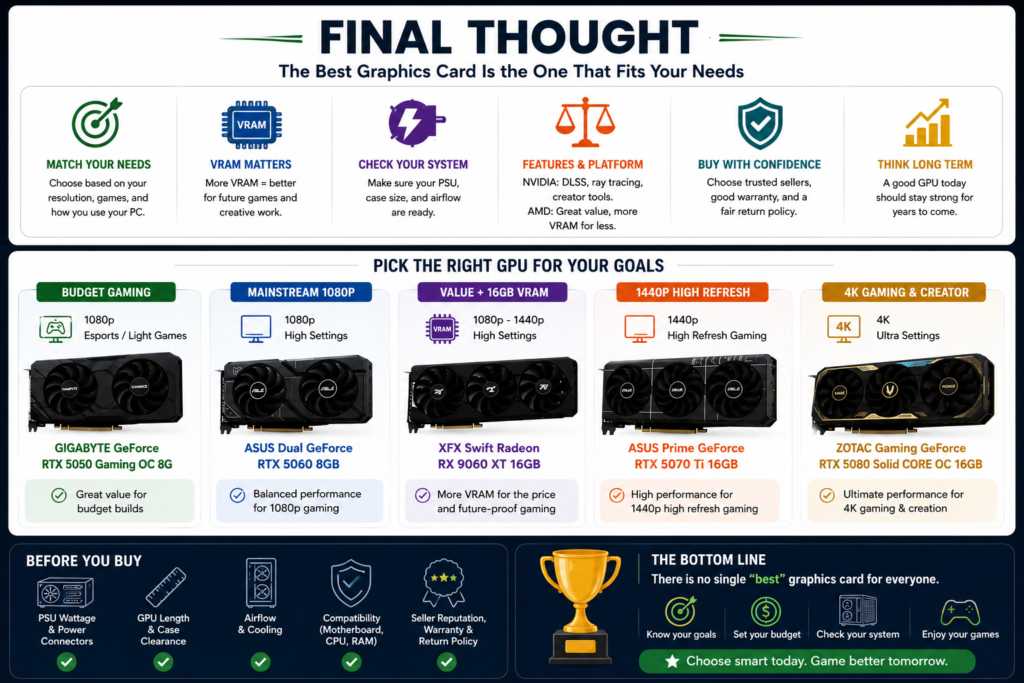
Choosing the right graphics card in 2026 is not about buying the most expensive GPU. It is about matching the card to your monitor, games, budget, power supply, case size, and long-term performance needs.
If you want the most affordable NVIDIA option in this list, the GIGABYTE GeForce RTX 5050 Gaming OC 8G is the entry-level pick for budget 1080p gaming and lighter games. If you want a stronger mainstream 1080p option, the ASUS Dual GeForce RTX 5060 8GB is the better fit.
If you care more about value and VRAM headroom, the XFX Swift Radeon RX 9060 XT 16GB is worth comparing because it offers 16GB of memory in a more value-focused position. For stronger 1440p gaming, higher settings, and more long-term flexibility, the ASUS Prime GeForce RTX 5070 Ti 16GB is the better match.
For 4K gaming, high-end builds, ray tracing, content creation, and heavier GPU workloads, the ZOTAC Gaming GeForce RTX 5080 Solid CORE OC 16GB is the most performance-focused option in this lineup. However, it also requires more careful checking for PSU capacity, power connectors, case clearance, airflow, seller reputation, warranty, and return policy.
Final recommendation: choose the RTX 5050 for budget gaming, the RTX 5060 for mainstream 1080p gaming, the RX 9060 XT 16GB for value and VRAM headroom, the RTX 5070 Ti 16GB for 1440p high-refresh gaming, and the RTX 5080 16GB for 4K gaming or creative work. The best graphics card is the one that fits your actual PC build and use case.